What Keyring is#
Keyring turns a HubSpot portal into the system of record for value a customer holds: points, gift-card balances, vouchers, and the membership that ties them to a person. It covers the whole loop — issue the value, deliver it, let the customer see it, spend it at a counter, and record what happened — without a separate loyalty database.
The point is not that it stores loyalty data. It is where it stores it: every balance, every voucher and every transaction is an ordinary CRM record on your own portal. So lists, workflows, reports and marketing email work on loyalty the same way they work on deals — and a marketer can build a campaign on "customers holding an unspent gift card" without asking anyone to export anything.
| Kind | Private HubSpot app (platform 2026.03), installed per portal |
| Built for | Businesses with physical counters — hospitality, retail, venues, multi-site groups |
| Stores data in | Custom CRM objects on your own portal. No external database holds your customer data |
| Customer surfaces | A web wallet, a durable loyalty-card QR, offer pages, and email |
| Staff surfaces | A browser-based scanner for any phone or tablet, a staff home screen, and three CRM cards |
| How to get it | Not distributed. Ask for a walkthrough |
Important
Maturity, stated plainly. Keyring is a working system that runs on demo portals and is exercised by an automated regression on every change. It has not yet been deployed against a real customer's live data. It carries deliberate demo-grade trade-offs — the most consequential being that installation is deliberately open so the app can bootstrap itself, and that revoking one till's access means rotating the secret for every till. Those are documented, and closing them is a bounded piece of work, but it is a prerequisite, not a formality, before real value moves through it. Ask for the hardening pass as part of any real deployment.
What it actually does#
Five capabilities, each of which is a thing a business already does badly on spreadsheets.
Gift cards with real balances#
A gift card is a record with a balance, a currency and a code. A customer can spend part of it — the till sends the amount, Keyring does the arithmetic and returns what is left. Balances can be topped up at the counter. Nothing about this needs the original purchase to be found again.
Vouchers and offers#
Four kinds of instrument, and the difference matters at the till: a balance (spend part), a product voucher (this specific item), a percentage discount, or an entry into a raffle or lottery draw. A voucher can be valid everywhere or only at named venues, single-use or good until it expires, and either generic (anyone holding the code) or bound to one named person.
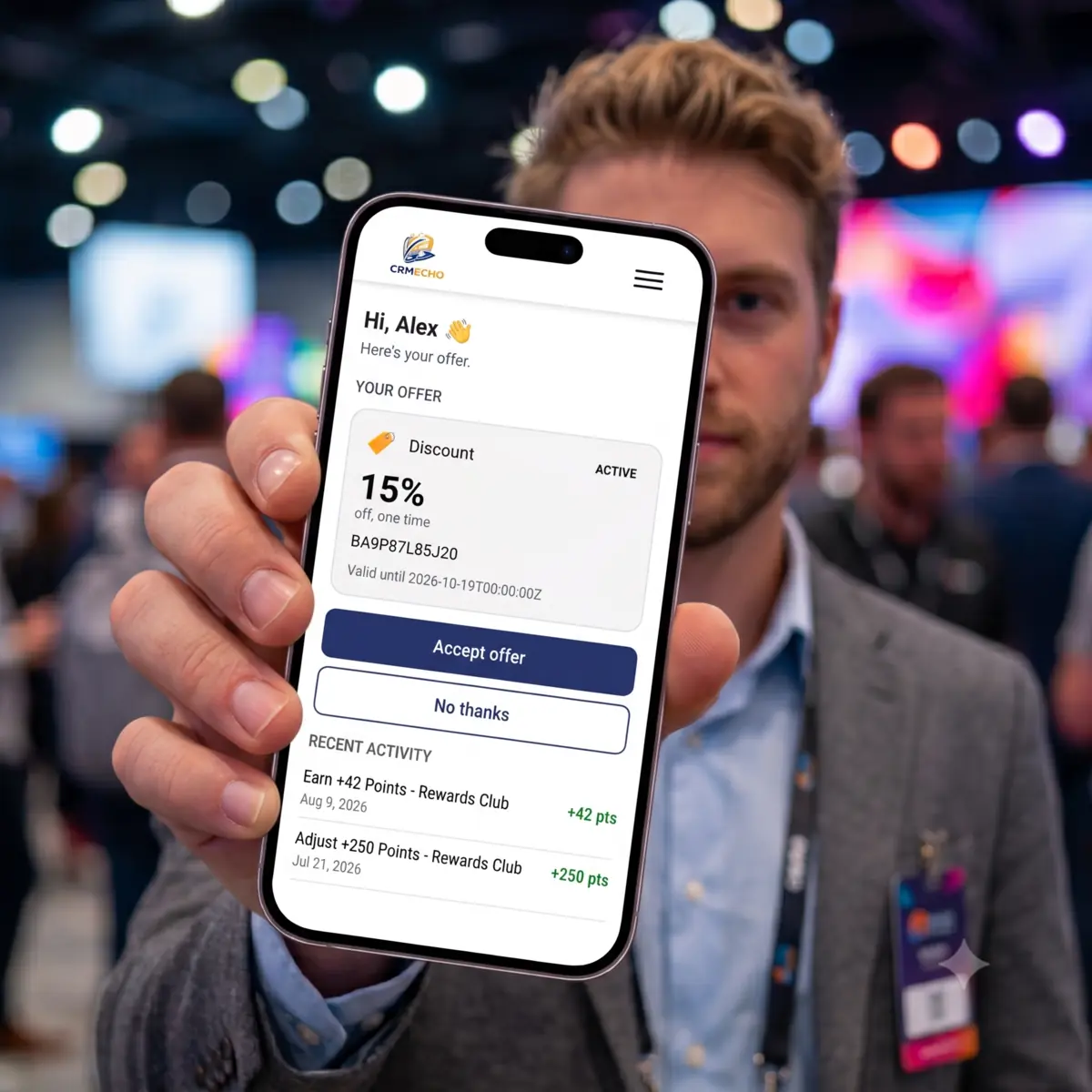
The customer surface adapts to what the programme is for. The same wallet renders as a single offer to accept or decline, as a full wallet of cards and vouchers, as a membership card with a points balance, or as a plain gift card — chosen once per install rather than built four times. The screen above is the single-offer shape; the same link on a loyalty install shows the membership and everything held.
Loyalty points and programmes#
A programme defines what a point is called, what it is worth per unit spent, and whether it applies brand-wide or at particular venues. Points are awarded from a spend amount or as a literal adjustment, and the balance lives on the membership record — never on an association, never derived by summing history at read time.
Membership and identity#
A customer enrols at the counter or through a workflow, and gets a durable QR loyalty card delivered by email. Scanning that card at any venue identifies them — and the response deliberately carries name only, never email or phone, so a shared till device is not a customer-data leak.
Multi-location control#
Every venue is a record with capabilities — whether staff there may identify, redeem, earn or issue. A till at a redeem-only bar cannot issue vouchers no matter what it sends, because that check happens on the server against the venue record, not in the app the staff member is holding. This is the mechanism that makes a franchise or a multi-site group safe to run on one portal.
And the reason a marketer cares: the journey is recorded#
Every incentive carries a journey state alongside its value state — issued → sent → viewed → claimed → redeemed, plus declined, expired and cancelled — each with its own timestamp, and each stamped only when the real event happens. Nothing is inferred to make a funnel look complete.
That gives you the questions a loyalty programme normally cannot answer: how many issued vouchers were never opened, how long between claiming and spending, which venue converts a claimed offer best, what proportion of a campaign is still outstanding as a liability. Because they are CRM records, those are HubSpot lists and reports — not a data request.
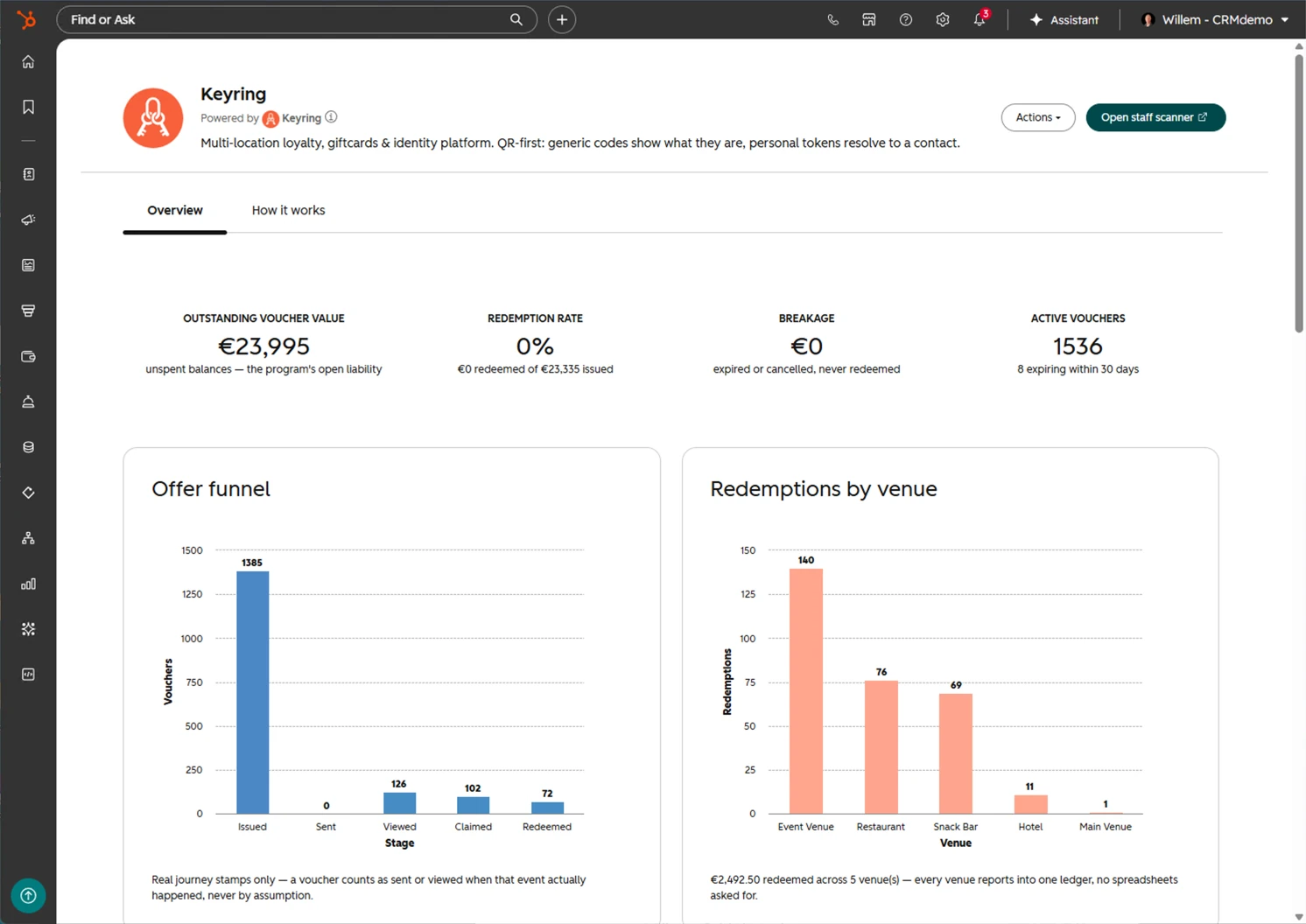
The operator's own view of that, without building a report: outstanding value as a liability figure, breakage, and the funnel from issued to redeemed with the drop-off visible at each stage.
What it does not do#
Stated up front, because these are the ones that reshape a plan if you find them late.
- It is not a payment system. Keyring moves stored value, not money. Card payments are a separate concern — on our stack that is Commerce.
- It does not push events to you. There are no outbound webhooks to arbitrary URLs. An integrator that wants activity polls for it.
- It is not a till. There is no cash drawer, no receipt printing (beyond a loyalty-card label), no product catalogue and no tax handling. It sits beside your point-of-sale system and tells it what discount to apply.
- It does not do per-integrator credentials yet. Access is per venue and per staff identity, which is real authority — but one integrator cannot be revoked without rotating the secret for everyone. See keyring-integration.md § What does not exist yet.
- It does not reconcile your accounting. Outstanding gift-card value is visible as CRM data; turning that into a liability figure in your ledger is your finance system's job.
What people see#
| Who | Surface | What it is |
|---|---|---|
| Customer | Wallet | A web page reached from a link or their loyalty-card QR. What it shows depends on the experience profile the install chose — a single offer to accept or decline, a full wallet of cards and vouchers, a membership with its points balance, or a plain gift card. No login, no password — the link itself is the credential |
| Customer | Loyalty card | A durable QR delivered by email and re-mintable at any time. Also printable as a physical card on a label printer |
| Customer | Offer page | Accept or decline a specific offer; the decision is recorded against the record, and only the actual owner can make it |
| Staff | Scanner | A browser page on any phone or tablet. Scan a card or a code, see what it is, and act — redeem, top up, award, issue, enrol or void |
| Staff | Staff home | Today's activity at this venue, so a supervisor can see the counter's own ledger without CRM access |
| Operator | CRM cards | Keyring context on the contact record inside HubSpot, including manual point adjustment |
| Operator | App pages | An in-HubSpot cockpit — programme and venue health, plus a guided tour of how the parts fit |
| Operator | Settings | Eight tabs covering programmes, venues, tokens, email, integrations and security |
Data model#
Everything is a CRM record. Five objects plus two extensions:
| Object | What it holds |
|---|---|
location | A venue, and its capabilities — the gate on what staff may do there |
loyalty_program | A programme: what a point is called, its earn rate, and its scope |
loyalty_membership | One record per person per programme. The points balance lives here |
loyalty_transaction | The ledger — one append-only row per movement of points or value, with the acting staff identity and the venue |
incentive | Vouchers, gift cards and entries: the value layer (redemption_type, balances, validity) and the journey layer (engagement_status and its eight timestamps) |
contact (extended) | Three added properties: the magic link, the QR image, and a locale hint |
app_setting | Key-value configuration, using our shared app-settings pattern |
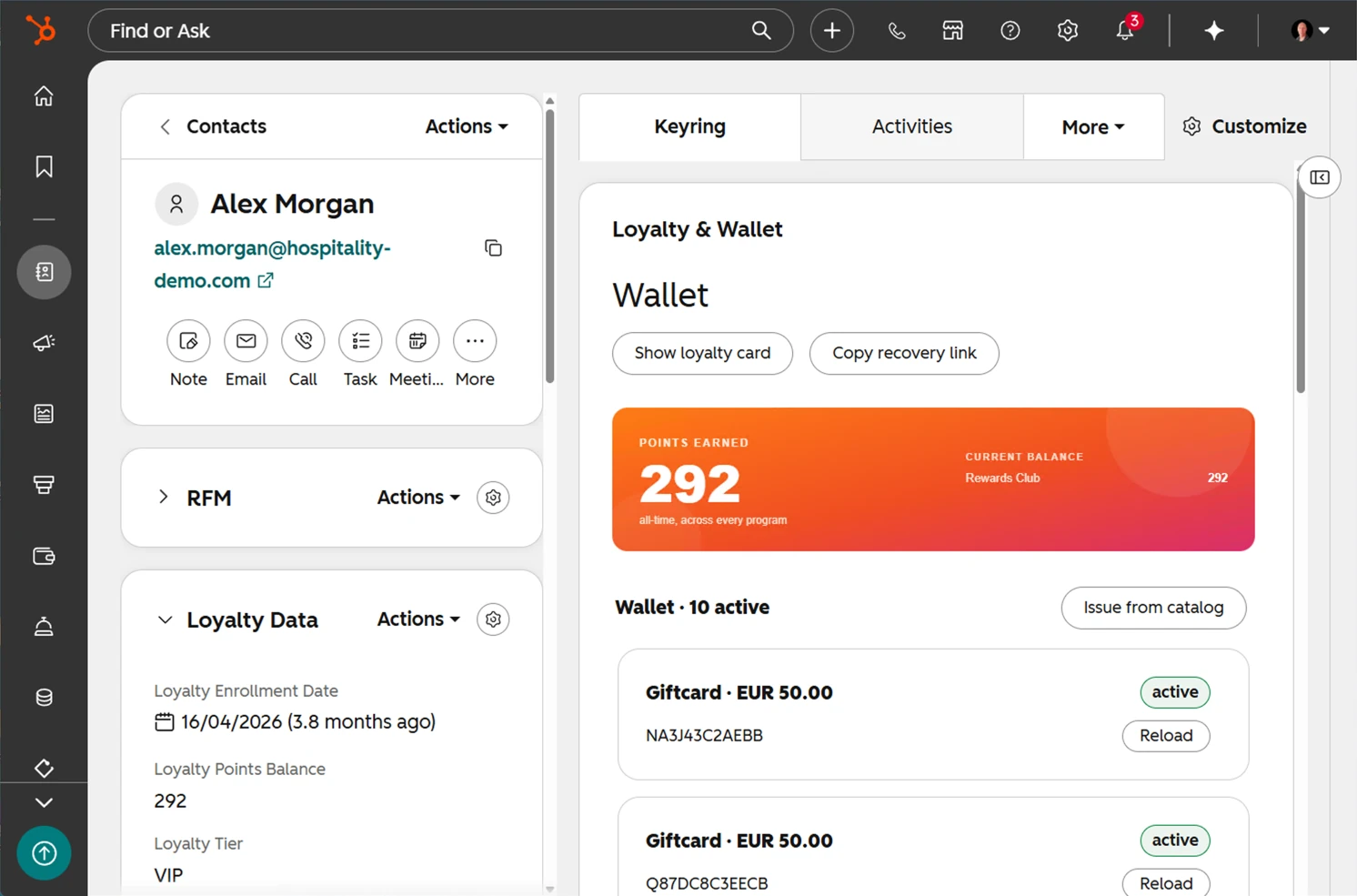
That is the whole argument for the data model in one screen: the balance, the vouchers and the tier are contact and CRM records, sitting in the record layout beside everything else your team already works from — not in a system someone has to be given a second login for.
Three things about this model are deliberate and worth copying whatever you build on:
- The ledger is append-only. There is no hard delete anywhere on the public surface. Reversing something writes a compensating row and marks the original — the audit trail survives the correction.
- Balances are stored, not derived. A balance is a property on the membership or the incentive, updated transactionally. Summing a ledger at read time is where loyalty systems go wrong at scale.
- The value state and the journey state are separate properties. Whether a voucher has been spent and whether the customer ever opened the email are different questions, and overloading one property to answer both loses the ability to ask either.
Associations use labels, not raw type ids — an incentive relates to a venue in two distinct ways (valid at, issued by), which a single unlabelled association cannot express. Resolve label names at runtime; never hardcode a numeric type id. The same goes for object type ids: resolve them from the schema list at runtime, because they differ per portal.
Integration seams#
| With | What crosses |
|---|---|
| A point-of-sale or property-management system | Two independent directions. Inbound: the POS calls Keyring to scan, read, redeem, top up, award and enrol — the full contract is keyring-integration.md. Outbound: after Keyring has committed a redemption, an adapter reports it to the provider's own system so the discount lands on the real bill. Adapters exist for Mews, Zettle and Shopify; all three are built and currently dormant, and none has been through a provider sandbox yet |
| Commerce | Vouchers at online checkout. A shopper enters a Keyring code in the cart; Commerce validates it, recomputes the discount from the live cart server-side, and spends it against Keyring only when the order genuinely reaches paid. Commerce integrates as an external POS would — no shared code, no privileged lane |
| Events | One scanner at the door. A venue running the Keyring scanner can hand a scanned EVT-… event ticket straight to the Events scanner rather than rejecting it, so door staff carry one device for loyalty cards and tickets. One-directional, and off unless configured |
The direction of authority never changes: Keyring is authoritative for the redemption. External systems are informed after the fact, never asked for permission. That is what makes a counter keep working when a provider's API is down, and it is the single most important thing to understand before designing against it.
Where to go next#
| You are | Read |
|---|---|
| Integrating a till, kiosk or third-party system | keyring-integration.md — auth, the QR contract, every endpoint, idempotency, error handling |
| Installing or operating it on a portal | keyring-setup.md — prerequisites, the manual steps, verification, what a reinstall destroys |
| Evaluating whether it fits | This page, then ask for a walkthrough. It demos live in about ten minutes, ending with a real scan |