Private App
Every guest on
one record.
Hospitality is worksby.design's private HubSpot app for hotel, restaurant, resort and wellness groups. Stays, visits, spend, points, gift cards and vouchers live on the guest's contact in your own portal — no separate loyalty database.
6
revenue categories that every venue's spend lands in — accommodation, F&B, retail, wellness, activities, other
5
lifecycle stages per guest, from prospect to lapsed, recomputed from stays and visits
8
journey states on every voucher, each stamped only when it really happens
01 Who it is for
One guest, every venue.
Hospitality is for groups that run several venues — restaurant and bar chains, hotel chains, resorts and wellness complexes. In most of them the booking engine knows the stays, the tills know the spend and the loyalty scheme lives in its own tool or a spreadsheet, so nobody sees the whole guest.
Restaurant chains
Checks with covers and spend per restaurant or bar, points on spend, gift cards spent in parts and a free-dessert voucher — each venue with its own permissions.
Hotel chains
A booking is a stay in a Stays deal pipeline, from enquiry to checked out. Next arrival, total nights and lifetime stay value sit on the guest, ready for a pre-arrival list.
Wellness complexes
Day passes as product vouchers, memberships with points, and every entry or treatment recorded as a visit at the spa, pool or treatment room it happened in.
Resorts
Rooms, restaurants, bars, spa and activities on one site — with spend during a stay attached to that stay, and day visitors kept apart from staying guests.
02 How it works
Every visit lands on the guest.
Three steps, all inside the portal you already run.
01 — Capture
Stays and visits arrive from a booking engine or till over the ingest API, from the staff scanner at the counter, or from the Commerce and Events apps. Sending the same record twice changes nothing.
02 — Recognise
Each new stay or visit recomputes the guest's profile on the contact: stays and nights, spend per category, favourite venue, next arrival, and a lifecycle stage from prospect to lapsed.
03 — Act
Lists, workflows, reports and marketing email use those properties like any other. Workflow actions enrol guests, issue vouchers into their wallet and award points.
03 The guest record
Stays, visits and spend on the contact.
A stay is a HubSpot deal in a dedicated Stays pipeline; a visit is one spend or attendance fact at a venue. Both roll up into a Guest profile property group on the contact.
- Stays pipeline: enquiry, option, confirmed, checked in, checked out, cancelled, no-show
- Lead booker and fellow guests as labelled contacts on the stay, the property as its venue
- Visits with amount, revenue category, covers and type at a named venue
- A visit during a stay attaches to that stay; any other is a day visit
- Total stays and nights, first stay, last departure, next arrival and its status
- Lifetime stay value and lifetime spend
- Spend per category — F&B, retail, wellness, activities, other
- Favourite venue and category, total visits, last visit date
- Lifecycle — prospect, first-time, returning, loyal, lapsed — on thresholds you set
Plain contact properties, recomputed from the records behind them.
The profile is recalculated from stays and visits rather than counted up, so every figure traces back to the records it came from. Because they are ordinary contact properties, any list, workflow or report segments on them — "loyal guests arriving within 14 days who never used the spa" is a list filter, not a data request.
04 Loyalty and value
Loyalty with a ledger.
Points, gift-card balances, vouchers and memberships are CRM records on the guest. Every movement is written to an append-only ledger with the venue and the member of staff who made it.
- Named programmes with their own point name, earn rate and brand-wide or per-venue scope
- Points from a spend amount or as a set adjustment, balances kept per programme
- Venues that may identify, redeem, earn or issue — checked on the server, not on the device
- Corrections written as compensating rows, so the audit trail survives them
- Gift cards spent in parts and topped up at the counter
- Product vouchers — a free drink, a dessert, a spa day pass
- Percentage discounts, one-time or until expiry, at every venue or named ones
- Raffle and lottery entries recorded — the draw itself stays with you
- Voucher templates and batch generation, ready to print
Every voucher keeps its journey.
Each voucher is stamped issued, sent, viewed, claimed and redeemed — or declined, expired or cancelled — only when that event happens, never inferred. How many were never opened, and how much value is still outstanding, become a HubSpot list or report.
05 At the counter
A scanner for staff, a wallet for guests.
Neither needs an app from a store. Both are pages on your own HubSpot website, opened on any phone or tablet.
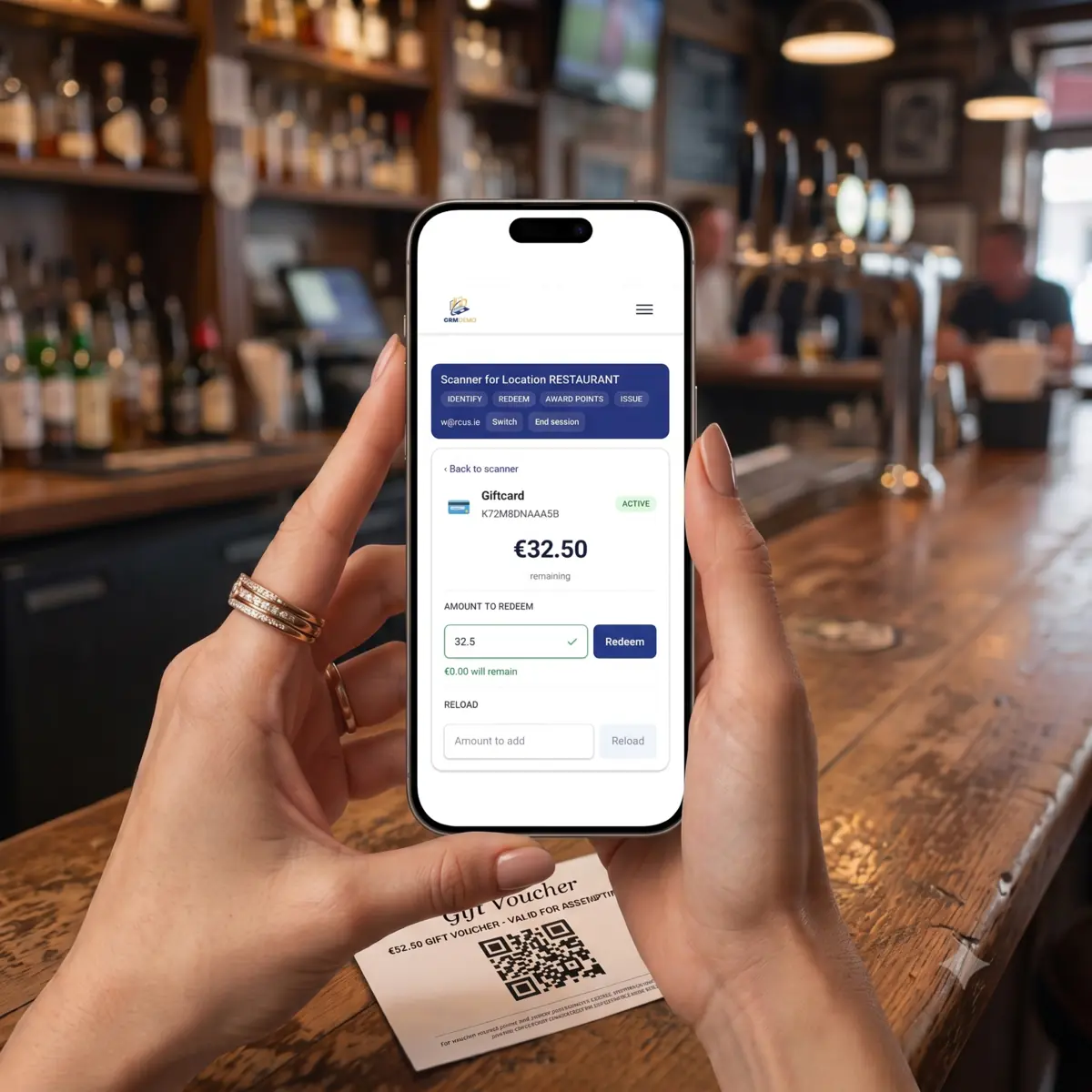
Staff scanner
- Sign in, pick the venue, scan a QR code or type a code
- Redeem, top up, award points, issue or void, with the outcome on screen
- A double tap returns the first result — nothing is charged twice
- Enrol a walk-in guest, with a duplicate check, ending on a member card
- An award with a spend amount also records the visit
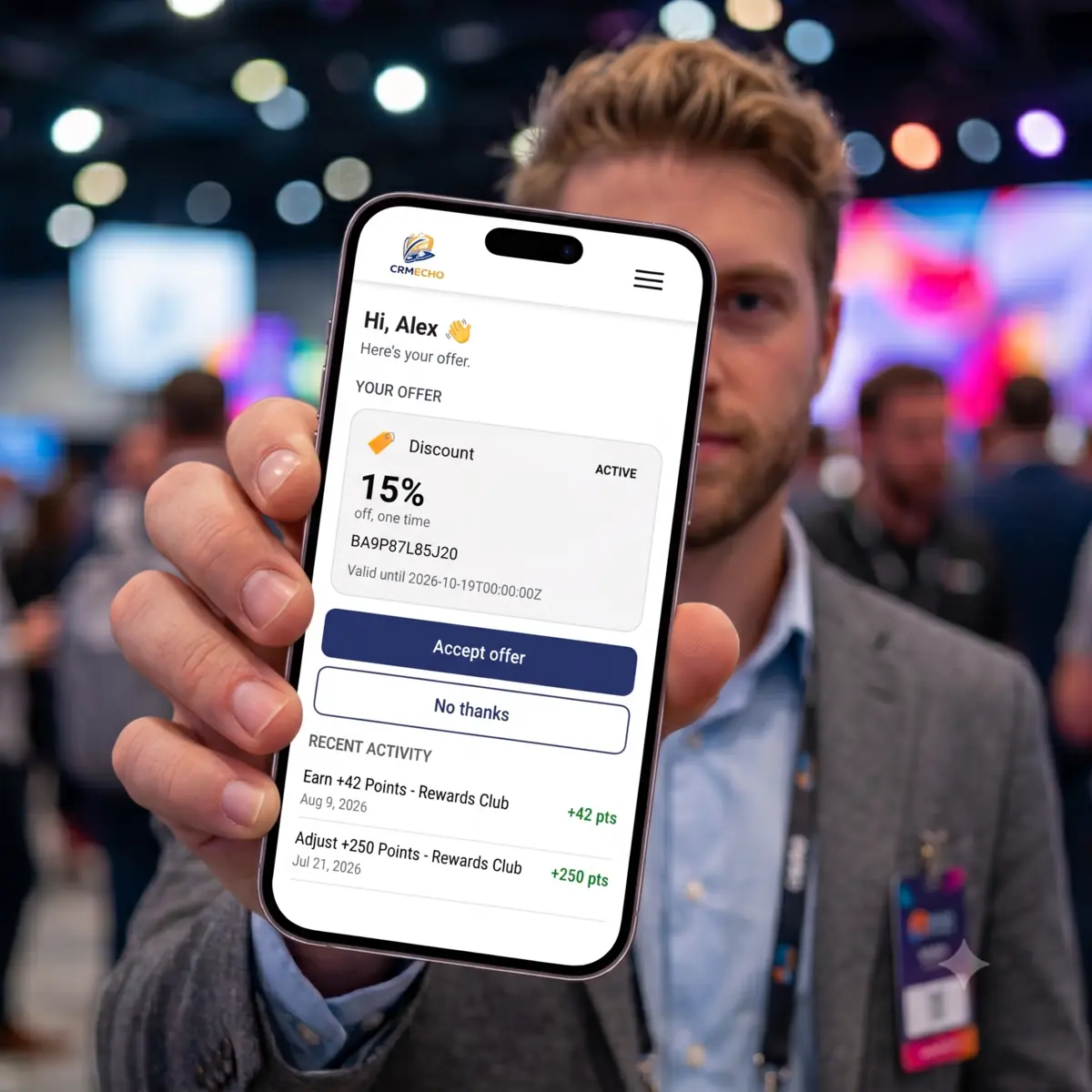
Guest wallet
- No login — the link in the guest's email or on their QR card opens it
- Membership cards, vouchers and recent activity on one page
- A QR code on every active voucher and membership card, scanned straight off the phone
- Follows the phone's light or dark setting
- Wallet labels in English or Dutch per guest, dates and amounts formatted to match
- Accept or decline an offer; a lost link can be requested again
06 Inside HubSpot
Guest context on the records you already open.
Cards on the contact, the stay and the visit, two app pages, and a nine-tab settings page that opens on a readiness check. No second login for anyone on your team.
Guest profile card
On the contact: lifecycle, stays and value, next and last stay, a spend-by-category chart, recent visits and open vouchers.
Loyalty & Wallet card
Points per programme and every wallet item, with issue and reload on the record, the member card to show, and a recovery link to copy.
Stay and Visit cards
On a stay: status, dates, value, its guests and their spend during the stay by category. On a visit: venue, amount, points earned and the stay it belongs to.
Guests view and Overview
App pages for arrivals today and over the next seven days, in-house guests, departures and spend by category — plus voucher liability, redemption rate and the offer funnel.
Workflow actions
- Enrol in loyalty programme — optionally writing the card's QR
- Issue voucher — from a catalogue template into the guest's wallet
- Award loyalty points — from spend or a set amount
- Create wallet link — the link and QR image on the contact
All four run in contact workflows.
Email modules
- Loyalty card — the QR and points per programme
- Voucher — the newly issued voucher, with its QR, code and date
- Each chooses English or Dutch from the guest's preferred language
The emails and the guest journeys around them are your own HubSpot workflows and marketing email.
07 Integrations
Every channel feeds one guest profile.
Hospitality receives facts and never polls another system. Booking engines, tills and sibling apps push stays and visits in; Hospitality stays authoritative for every redemption.
Ingest API
A booking engine, PMS or till posts stays and visits over HTTP. A retry never creates a duplicate, and each outside system gets its own API client: a credential you can switch off or re-key without touching any other till or feed.
Staff API for tills
A point-of-sale system can scan, redeem, top up and award exactly as the scanner does, under the same per-venue permissions.
Commerce and Events
worksby.design's Commerce and Events apps turn a paid webshop order or an event check-in into a visit on the guest, switched on per portal.
POS and PMS adapters
Adapters that report a redemption back to Mews, Zettle and Shopify are built, and each is enabled per provider after verification in that provider's sandbox.
Authentication, the QR contract and every endpoint: the integration guide →
08 Getting it
Deployed on request, maintained after.
Hospitality is a private app: worksby.design deploys it into your portal with a portal admin present, and keeps it working across HubSpot platform versions. There is no listing and no public install link.
What you need
- A HubSpot portal with custom objects
- A published website domain — the wallet and scanner live on it
- Marketing email, for the two email modules
- Workflows, for the four actions
What the install creates
- Custom objects for venues, programmes, memberships, the ledger, vouchers and visits
- A Stays deal pipeline and a Guest profile property group
- The wallet and scanner pages, and the settings
- Voucher-expiry and tier workflows, created switched off
What it does not do
- It is not a till or a payment system — it tells the till what to apply
- It never pulls from a PMS or POS, and sends no outbound webhooks
- No guest app to install — the wallet is a web page
- No raffle draw and no recurring billing
Status, stated plainly.
Hospitality runs today on demo portals, where an automated live regression passes 134 of 134 checks on both (4 November 2026). It has not yet run on a portal with real guest data: a production deployment starts with a security tightening pass — including a separate credential per integrator — before real guest value moves through it.
09 Documentation
Read how it works.
Three references, each also served as plain Markdown for AI assistants.
What Hospitality is
Its surfaces, the data model, and how it connects to a till, to Events and to Commerce.
Connecting a till or booking engine
Authentication, the QR contract, every endpoint, idempotency and error handling.
Running it on a portal
Prerequisites, what the install provisions, the decisions only you can make, and verification.
See it on a phone.
A walkthrough takes about ten minutes and ends with a real scan. Hospitality is deployed case by case, starting from a conversation about your venues.
Facts on this page checked .