What Hospitality is#
Hospitality makes a HubSpot portal the system of record for a hospitality group's guests: what a guest holds — points, gift-card balances, vouchers, memberships — and what a guest does — stays, visits and spend per venue. Booking engines and tills push those facts in, staff scan and redeem at the counter, and guests see their wallet on their phone. There is no separate loyalty or guest database.
The point is where it keeps them. Every stay, visit, balance, voucher and transaction is an ordinary CRM record on your own portal, and each guest's history is summarised into plain contact properties. So lists, workflows, reports and marketing email work on guest history the way they work on deals: "loyal guests arriving within 14 days who never used the spa" is a HubSpot list, not a data request.
One engine serves a restaurant chain, a hotel chain, a wellness complex and a resort. Nothing in it branches on the kind of business — a section with no data behind it simply does not show.
| Kind | Private HubSpot app (platform 2026.09), installed per portal |
| Built for | Multi-site hospitality — restaurant and café chains, hotel chains, resorts, spas and wellness complexes, venues |
| Stores data in | Your own portal: six custom objects of its own plus a shared settings object, a Stays deal pipeline, and contact properties. No external database holds your guest data |
| Fed by | Booking engines, property-management systems, tills and spa systems pushing stays and visits over HTTP; the staff scanner; our Commerce and Events apps |
| Guest surfaces | A web wallet with a QR per voucher and membership card, a durable loyalty-card QR, offer pages, and two email modules |
| Staff and operator surfaces | A browser-based scanner for any phone or tablet, a staff home screen, six CRM cards, three app pages inside HubSpot, and a nine-tab settings page |
| How to get it | Not distributed. Ask for a walkthrough |
Important
Maturity, stated plainly. Hospitality runs on our demo portals and is exercised by an automated regression on every change. It has not yet been deployed against a real customer's live data. It carries deliberate demo-grade trade-offs — the most consequential being that revoking one till's or one booking feed's access means rotating the secret for all of them, and that the workflow actions are not signature-checked. Those are documented, and closing them is a bounded piece of work, but it is a prerequisite, not a formality, before real guest data or real value moves through it. Ask for the hardening pass as part of any real deployment.
How this page states what is live#
Every capability below carries one of these, and moves up only when it has been seen working — a capability that exists in code but has not run on a portal says so.
| Status | Meaning |
|---|---|
| Live | Running on our demo portals and checked by the automated regression on every change |
| Live, hand-proven | Running on our demo portals and proven in a browser, on a phone or by a proof script — but outside the automated regression |
| Built, unproven | The code exists, but it has not yet been proven end to end on a portal. The line says what is missing |
| Not in the app | Deliberately out of scope, or HubSpot configuration you build on top of the app's data |
What it actually does#
The guest profile — a guest's history as contact properties#
Every stay and visit rolls up into 21 contact properties in a Guest profile group, so every HubSpot list, workflow and report can segment on guest history without knowing a custom object exists.
| Property set | A segment it answers |
|---|---|
| Total stays, total nights, first stay date, last departure date | "returning hotel guests" |
| Next arrival and departure date, next stay status, next accommodation type | "arriving within 14 days" |
| Lifetime stay value, lifetime spend | "top 10 % by value" |
| Spend per category: food & beverage, retail, wellness, activities, other | "loyal guests who never used the spa" |
| Total visits, last visit date | "no visit in six months" |
| Favourite venue, favourite category | "bar regulars" |
| Guest lifecycle, and when the profile was last computed | a win-back of lapsed guests |
The properties are recomputed from the facts, never incremented. Whenever a stay or visit for a guest arrives, all 21 are rebuilt from that guest's stays and visits and replace what was there — so a retried delivery or a double tap can never count anything twice. Cancelled and no-show stays count for nothing; only completed visits count as spend. Lifetime stay value counts only stays where the guest was the lead booker: a guest on someone else's booking stayed, but did not spend that booking's money.
The lifecycle counts occasions — an arrived stay, or a day with a visit outside any stay — so a restaurant regular climbs the same ladder as a hotel guest:
| Stage | When |
|---|---|
| Prospect | No occasion yet — including an enrolled member, or a first-timer whose stay is still ahead |
| Lapsed | At least one occasion, nothing upcoming, not in-house, and the last activity more than 400 days ago |
| Loyal | 3 or more occasions |
| Returning | 2 or more occasions |
| First-time guest | Exactly one occasion |
They are evaluated in that order, so a loyal guest who stops coming reads lapsed, and becomes loyal again the moment a new stay is booked. Both thresholds are settings. Status: Live.
Stays — a deal in a Stays pipeline#
A stay is a HubSpot deal in a dedicated Stays pipeline, with the stages Enquiry · Option · Confirmed · Checked in · Checked out · Cancelled · No-show. The lead booker and the other guests are contacts on labelled associations (Lead booker, Guest); the property is a venue record. Dates, nights, accommodation type and unit, party size, booking channel, purpose, value and currency are deal properties in a Stay group. Because a stay is a deal, HubSpot's own forecasting, revenue reporting and deal workflows work on stays without anything extra. Status: Live.
Visits — one spend or attendance fact at a venue#
A visit is a record of its own: a purchase, reservation, attendance, treatment or booking at a venue, with amount, currency, covers and items. It carries the venue's revenue category as it was at the time, so re-categorising a venue later does not rewrite history. A visit that falls inside a stay of the same guest at the same property — or at another venue of the same brand, such as the spa of the resort they are staying at — attaches to that stay automatically. Anything else is a day visit.
Visits arrive three ways: pushed by a till or POS over HTTP, written by the staff scanner when it awards points from a spend amount, and pushed by our Commerce and Events apps. Status: Live — attaching a visit at the stay's own property is proven on a portal; attaching one at a same-brand venue is tested offline but not yet seen on one.
A visit can also earn loyalty points once, at a venue allowed to award them — a setting that is off by default. Status: Built, unproven — the scanner's own award path is live, but an earn triggered by a pushed visit has not yet run on a portal.
Loyalty points and programmes#
A programme defines what a point is called, what it is worth per unit spent, and whether it applies brand-wide or at particular venues. Points are awarded from a spend amount or as a literal adjustment, and the balance lives on the membership record — never on an association, never derived by summing history at read time. Different programmes are different currencies: points are never added up across them. Status: Live.
Tiers sit on the membership, and a tier-promotion workflow ships with the app, installed switched off. Status: Built, unproven — switch it on and see one promotion before relying on it.
Gift cards, vouchers and offers#
Four kinds of instrument, and the difference matters at the till: a balance (a gift card spent in parts and topped up at the counter), a product voucher (this specific item — a free dessert, a pool day pass), a percentage discount, or an entry into a raffle or lottery. A voucher can be valid everywhere or only at named venues, single-use or good until it expires, and either generic (anyone holding the code) or bound to one named person. Vouchers come from a catalogue of templates, singly or in printed batches. Status: Live — the raffle draw itself is not in the app.
A voucher-expiry workflow ships switched off. Status: Built, unproven.
The wallet and the loyalty card#
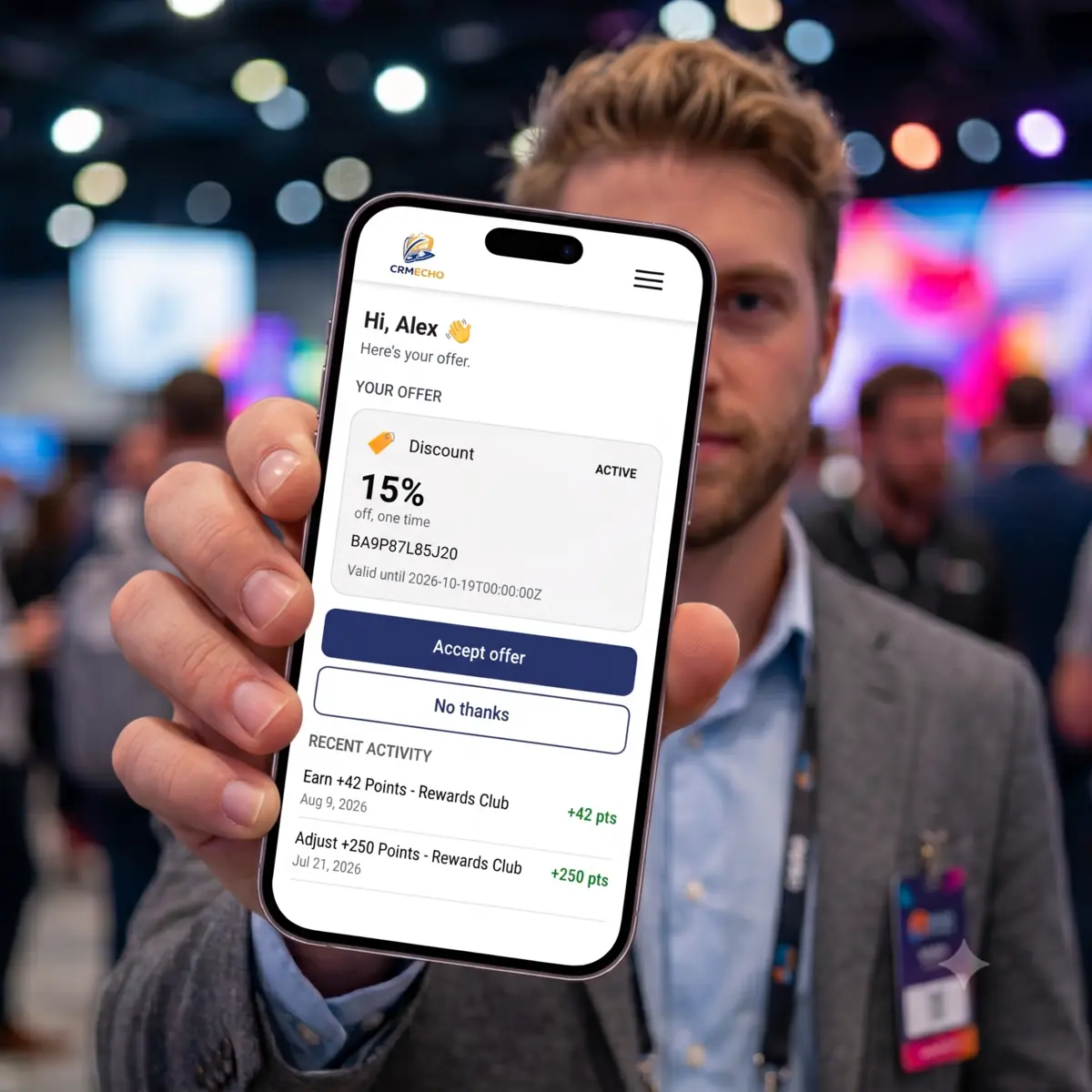
The guest surface adapts to what the programme is for. The same wallet renders as a single offer to accept or decline, as a full wallet of cards and vouchers, as a membership card with a points balance, or as a plain gift card — chosen once per install rather than built four times. The screen above is the full-wallet shape holding one gift card; on a loyalty install the same link also shows the membership card and its points. No login, no password: the link itself is the credential.
- A QR on every active voucher and membership card, so staff scan it straight off the guest's phone. A voucher's QR is its code; a membership's QR is the same identity link as the loyalty card. Live, hand-proven.
- Light and dark mode — the wallet and the scanner follow the phone's setting and stay readable in both. Live, hand-proven.
- The guest's own language — the wallet and offer pages in English or Dutch, per guest. Live; dates and amounts formatted for that language are Live, hand-proven. The activity lines the engine writes ("Earn", "Adjust") stay English in a Dutch wallet, and the scanner's Dutch screens are Built, unproven.
- A durable loyalty-card QR delivered by email and re-creatable at any time, also printable on a label printer. Scanning it at any venue identifies the guest — and the response deliberately carries name only, never email or phone, so a shared till device is not a customer-data leak. Live; label printing is Built, unproven (it needs a configured label printer).
- Claiming and recovery — a generic printed voucher becomes a guest's own when they enter an email, and a lost link can be re-requested without revealing whether the address is known. Live.
The counter: one scanner for every venue#
A browser page on any phone or tablet. Staff sign in, pick their venue, scan a QR or type a code, and act: redeem, top up, award, issue, enrol a walk-in, or void. A double tap returns the same result rather than charging twice. Status: Live; enrolling a walk-in is Live, hand-proven.
Staff sign in as themselves, with their own HubSpot member login on the portal's site. There is no PIN and no typed e-mail: the server reads who is signed in from HubSpot's membership session and admits only a contact whose Staff access includes Hospitality — switched on per person from their contact record. Tills and booking engines never sign in as a person; each gets its own API client. Status: Live, hand-proven (signed-in staff admitted, a signed-in non-staff contact refused, a request naming someone else ignored).
Multi-location control#
Every venue is a record with capabilities — whether staff there may identify, redeem, earn or issue, and whether a booking engine or till feed signing in there may ingest stays and visits. A till at a redeem-only bar cannot issue vouchers no matter what it sends, because that check happens on the server against the venue record, not in the app the staff member is holding. This is the mechanism that makes a franchise or a multi-site group safe to run on one portal. Status: Live.
And the reason a marketer cares: the journey is recorded#
Every incentive carries a journey state alongside its value state — issued → sent → viewed → claimed → redeemed, plus declined, expired and cancelled — each with its own timestamp, and each stamped only when the real event happens. Nothing is inferred to make a funnel look complete.
That gives you the questions a loyalty programme normally cannot answer: how many issued vouchers were never opened, how long between claiming and spending, which venue converts a claimed offer best, what proportion of a campaign is still outstanding as a liability. Because they are CRM records, those are HubSpot lists and reports — not a data request. Status: Live.
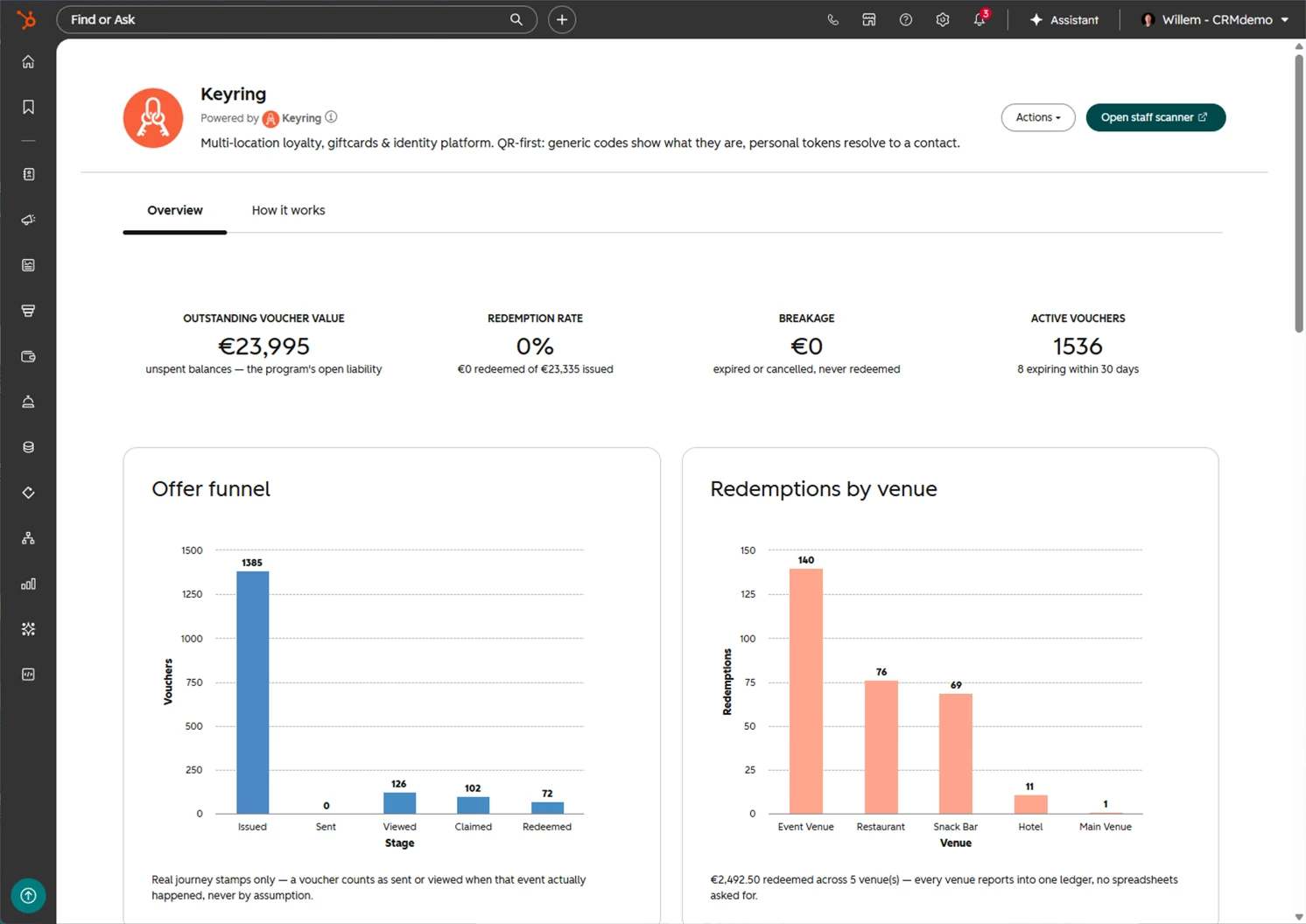
The operator's own view of that, without building a report: outstanding value as a liability figure, breakage, and the funnel from issued to redeemed with the drop-off visible at each stage.
What people see#
| Who | Surface | What it is | Status |
|---|---|---|---|
| Guest | Wallet | A web page reached from a link or a QR. Shaped by the install's experience profile; a QR per active voucher and membership; light and dark; English or Dutch | Live (QR and dark mode: hand-proven) |
| Member | Wallet tab in our Members Portal | A guest who has a member login sees their own wallet as a tab of the Members Portal — no link, no code; the wallet knows them from their sign-in. Switched on per Portal page | Built — the wallet is proven drawing the signed-in member's own wallet on a portal page; the tab inside Portal not yet seen |
| Guest | Loyalty card | A durable QR delivered by email and re-creatable at any time; printable as a physical card | Live (printing: built, unproven) |
| Guest | Offer page | Accept or decline a specific offer; the decision is recorded against the record, and only the actual owner can make it | Live, hand-proven |
| Guest | Two modules for HubSpot marketing email: a loyalty card (QR and points per programme) and a voucher (the voucher just issued, with its QR, code and date), each in English or Dutch | Live, hand-proven (in HubSpot's send preview) | |
| Staff | Scanner | Scan a card or a code, see what it is, and act — redeem, top up, award, issue, enrol or void | Live |
| Staff | Staff home | Today's activity at this venue, so a supervisor can see the counter's own ledger without CRM access | Built, unproven |
| Operator | CRM cards | Six cards on contact, deal, visit and incentive records — below | See below |
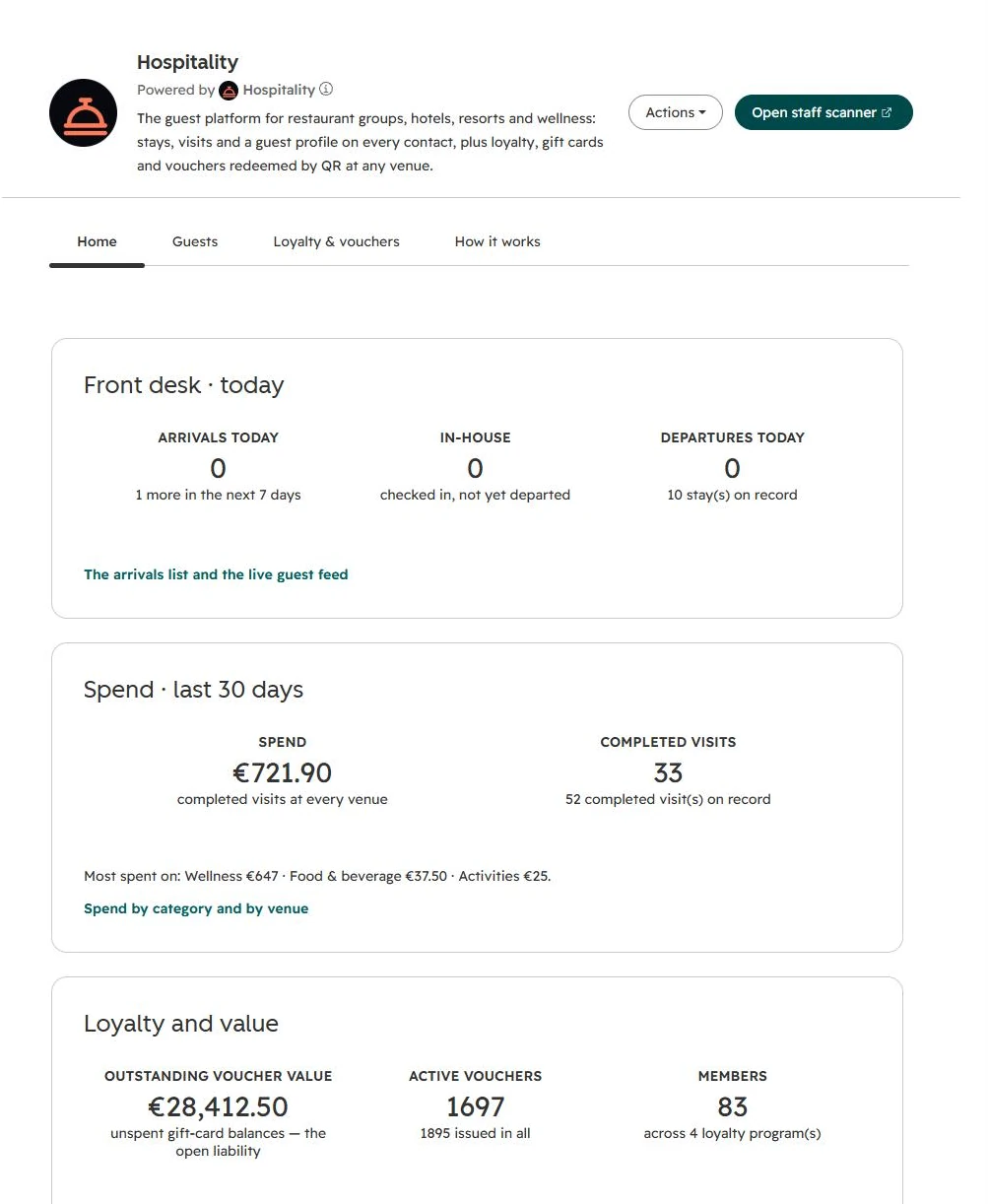
| Operator | App pages | Inside HubSpot: a Home (the front desk today, visit spend over 30 days, the loyalty headline, the lifecycle mix, one merged list of what needs attention); a Guests view (arrivals today and over the next seven days, in-house guests, departures, spend by category, top venues, the lifecycle mix, a live feed of visits and redemptions); Loyalty & vouchers (voucher liability, redemption rate, breakage, the offer funnel, redemptions by venue, a live counter feed); and a How it works talk track | Live, hand-proven |
| Operator | Settings | Nine tabs — Setup · Experience · Programs · Locations · Guests & sources · Catalog · Integrations · Adapters · Security. Setup opens on a readiness check | Live, hand-proven |
CRM cards#
| Card | On | What it shows | Status |
|---|---|---|---|
| Guest profile | Contact | Lifecycle, stays and value, the next and the last stay, a spend-by-category chart, recent visits, open vouchers | Live, hand-proven |
| Loyalty & Wallet | Contact | Lifetime points, the balance per programme, wallet tiles, issue from the catalogue and reload, enrol and adjust points, show the loyalty card, copy a short-lived recovery link | Live, hand-proven |
| Stay | Deal | Status, dates, booking value; the guests with their role; visits and spend during the stay by category. On a deal outside the Stays pipeline it says Not a stay and shows nothing of it | Live, hand-proven |
| Visit | Visit | Venue, amount, the points it earned, and its stay or "a day visit" | Live, hand-proven |
| Incentive Lifecycle | Incentive | A voucher's balance history and journey; reprint | Built, unproven |
| Incentive Generator | Contact | Bulk-create vouchers from a catalogue template and print them | Built, unproven |
We place Guest profile above Loyalty & Wallet on one contact tab named Guest. Placing cards on record tabs is a per-portal layout step in HubSpot, not something the install does.
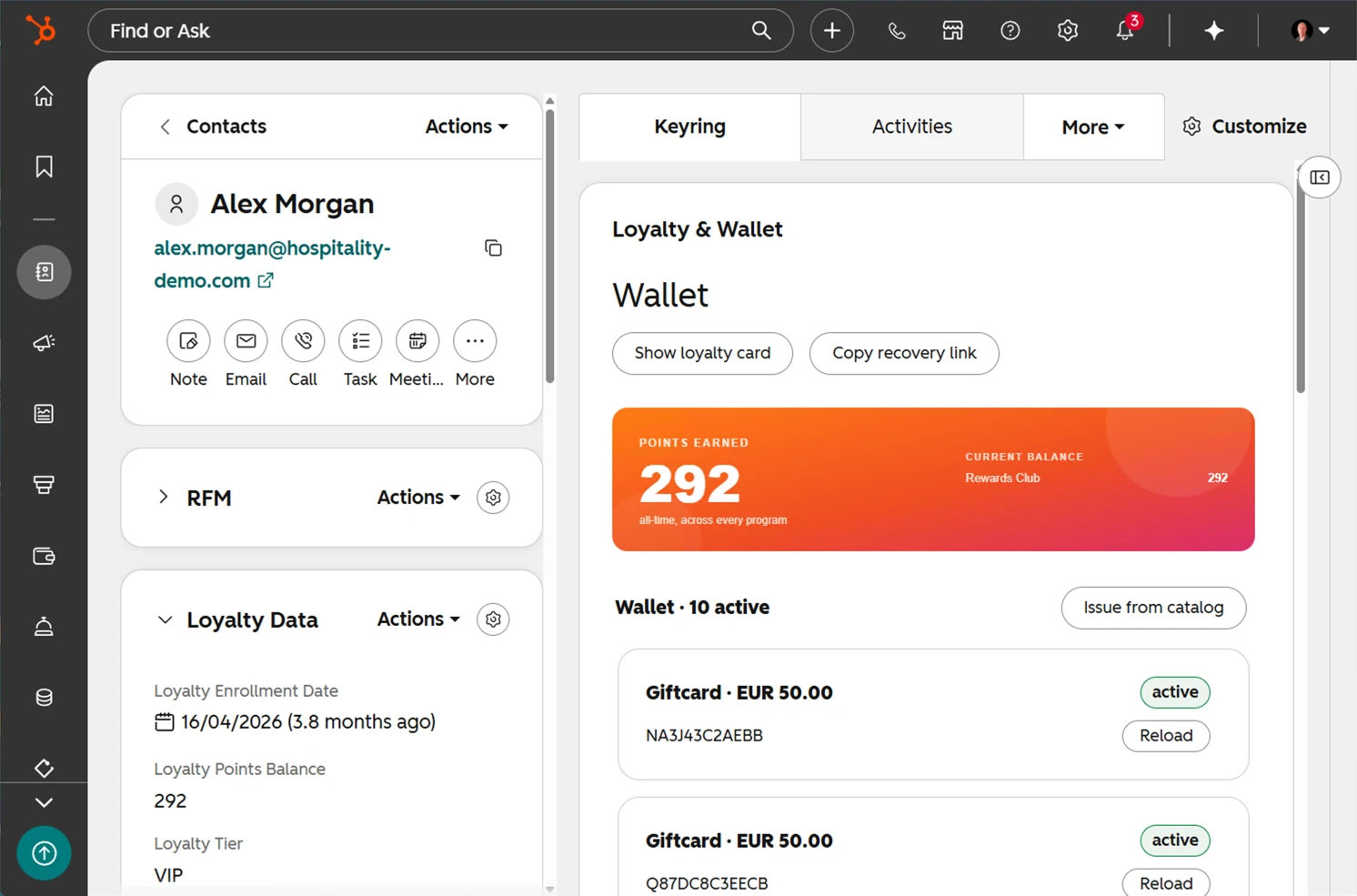
That is the whole argument for the data model in one screen: the stays, the spend, the lifecycle and the points are contact and CRM records, sitting in the record layout beside everything else your team already works from — not in a system someone has to be given a second login for.
Workflow actions and lifecycle workflows#
Four actions appear in HubSpot's workflow editor. All four run on contact workflows; to act on an order or an event registration, trigger through an association to the contact.
| Action | What it does | Status |
|---|---|---|
| Enrol in loyalty programme | Enrols the contact, optionally writing their loyalty-card QR | Live, hand-proven |
| Issue voucher | Issues a personal voucher from a catalogue template into the guest's wallet | Live, hand-proven |
| Award loyalty points | Awards points from a spend amount or as a literal number | Live |
| Create wallet link | Writes the guest's wallet link and QR image onto the contact, for an email to use | Live |
Two workflows ship switched off so an install never silently changes existing records: voucher expiry and tier promotion. Built, unproven until switched on and seen once. The guest-journey workflows a hotel or resort wants — pre-arrival, in-house, post-stay, win-back — are ordinary HubSpot workflows built on the guest-profile properties and these four actions; they are not in the app.
Demo datasets and story packs#
For demos and evaluation, six datasets install from the Setup tab: generic (the default), a café franchise, a resort (nine venues and six guests with stays and visits — the automated regression's own fixture), a restaurant chain, a hotel chain and a wellness complex. Re-seeding never duplicates; a reset archives only the records the seed created. Demo dates are relative and can be re-anchored on today, so "arriving in five days" stays true on demo day. The resort set is Live; the generic and franchise sets are Live, hand-proven; the restaurant, hotel and wellness sets are Built, unproven. Seed one per portal — several mix on every surface that lists venues or guests.
A story pack carries a specific narrative — venues, programmes, guests, offers, stays and visits, labels per language — and installs by an admin action, validated first with nothing written if it fails. Customer content lives in the pack, never in the app. Installing one replaces the portal-wide voucher catalogue, experience profile and labels. Live, hand-proven.
What it does not do#
Stated up front, because these are the ones that reshape a plan if you find them late.
- It is not a payment system. Hospitality moves stored value, not money. Card payments are a separate concern — on our stack that is Commerce.
- It does not pull from your systems. Booking engines, tills and sibling apps push facts to it; it never polls a PMS or POS, and it sends no outbound webhooks. An integrator that wants activity polls for it.
- It does not create guests from a feed. A pushed stay or visit names an existing contact or is refused, and nothing is written for it. Creating the contact stays with your own systems — a form, an import, a sync — and the record is sent again afterwards.
- It does not re-attach visits after the fact. A visit attaches to a stay when the visit arrives. If the stay arrives later, the earlier visits stay day visits unless they are sent again.
- It is not a till. There is no cash drawer, no receipt printing (beyond a loyalty-card label), no product catalogue and no tax handling. It sits beside your point-of-sale system and tells it what discount to apply.
- It is not a guest app. The wallet is a web page; your own app can open or embed it.
- It does not give an integrator less than its venue allows. Each booking engine or POS gets its own API client — its own id and secret, switched off or re-keyed without touching anyone else (live since 4 November 2026) — but a client acts with the full capabilities of its venue; give it a venue of its own to narrow that. See hospitality-integration.md § A credential of your own.
- It does not draw raffles. Entries are recorded; winners are not picked.
- It does not bill memberships. A programme with tiers is not a recurring subscription; recurring billing is Commerce's concern.
- It does not reconcile your accounting. Outstanding gift-card value is visible as CRM data; turning that into a liability figure in your ledger is your finance system's job.
- It does not configure your marketing. Lists, guest-journey workflows, emails, campaigns and their revenue attribution through the Stays pipeline are HubSpot configuration on top of the app's data.
Data model#
Everything is a CRM record on your portal.
| Object | What it holds |
|---|---|
location | A venue: its type, revenue category, brand, an optional id from your own systems, and its capabilities — the gate on what staff and feeds may do there |
loyalty_program | A programme: what a point is called, its earn rate, and its scope |
loyalty_membership | One record per person per programme. The points balance lives here, with the tier |
loyalty_transaction | The ledger — one append-only row per movement of points or value, with the acting staff identity and the venue |
incentive | Vouchers, gift cards and entries: the value layer (redemption_type, balances, validity) and the journey layer (engagement_status and its eight timestamps) |
visit | One spend or attendance fact at a venue, with its category snapshot, its source identity and a unique operation key |
| Deal in the Stays pipeline | A stay, its stage the stay's status, with a Stay property group, its source identity and a unique operation key |
contact (extended) | The guest: the 21 Guest-profile roll-ups and a unique External guest ID (your system's id for them), plus the wallet link, the QR image and a preferred locale |
app_setting | Key-value configuration, using our shared app-settings pattern |
The options a list or a workflow filters on:
| Property | Options |
|---|---|
Venue capabilities | identify · redeem · earn · issue · ingest |
Venue location_type | accommodation · hotel · restaurant · bar · cafe · store · spa · pool · activity · reception · venue · office · other |
Venue revenue_category, visit venue_category | accommodation · fnb · retail · wellness · activities · other |
| Stay stage | Enquiry · Option · Confirmed · Checked in · Checked out · Cancelled · No-show |
Stay stay_booking_channel | direct_web · app · phone · ota · agent · business · other |
Stay stay_purpose | leisure · business · group · event |
Visit visit_type | purchase · reservation · attendance · treatment · booking |
Visit status | booked · completed · cancelled · no_show |
Contact hospitality_lifecycle | prospect · first_time · returning · loyal · lapsed |
Incentive redemption_type | balance · product · percentage · entry |
Incentive engagement_status | created · issued · sent · viewed · claimed · declined · redeemed · expired · cancelled |
Ledger reason | earn · redeem · adjust · reload · void · identify · issue |
Associations use labels, because several pairs relate in more than one way — an incentive relates to a venue as Valid at and as Issued by, a stay to a contact as Lead booker and as Guest:
| From → to | Label names |
|---|---|
| incentive → location | valid_at_location, issued_by_location |
| incentive → contact | owner_contact |
| loyalty_program → location | program_locations |
| loyalty_membership → loyalty_program | membership_program |
| loyalty_transaction → loyalty_program · location · incentive · visit | transaction_program, transaction_location, transaction_incentive, transaction_visit |
| stay (deal) → contact | stay_lead_booker, stay_guest |
| stay (deal) → location | stay_property |
| visit → contact · location · stay (deal) | visit_guest, visit_venue, visit_stay |
The label names are the contract, and they are resolved by name at runtime. The numeric association type ids differ on every portal, so never hardcode one. HubSpot makes label names unique across a whole portal, which is why each carries a prefix. The same goes for object type ids: resolve them from the schema list at runtime.
Four things about this model are deliberate and worth copying whatever you build on:
- The ledger is append-only. There is no hard delete anywhere on the public surface. Reversing something writes a compensating row and marks the original — the audit trail survives the correction.
- Balances are stored; profiles are recomputed. A balance is value, so it is a property updated transactionally beside its ledger row — summing a ledger at read time is where loyalty systems go wrong at scale. A guest profile is a summary, so it is rebuilt from the facts every time — adding a delta to a stored figure is where analytics go wrong on the first retry.
- A duplicate is refused by a claim, never avoided by a search. Every stay, visit and ledger operation carries a unique key that is claimed in the same write that creates the record. HubSpot's search lags writes by seconds, so "search first, then create" duplicates on a retry; a unique key cannot.
- The value state and the journey state are separate properties. Whether a voucher has been spent and whether the guest ever opened the email are different questions, and overloading one property to answer both loses the ability to ask either.
Integration seams#
| With | What crosses | Status |
|---|---|---|
| A booking engine, PMS, POS or spa system — facts in | The system pushes stays and visits; a resend updates the same record and never duplicates. The full contract is hospitality-integration.md | Live |
| A till or kiosk — value in | The till calls Hospitality to scan, read, redeem, top up, award and enrol, exactly as the staff scanner does | Live |
| A POS or PMS provider — reporting out | After Hospitality has committed a redemption, an adapter reports it to the provider's own system so the discount lands on the real bill. Adapters exist for Mews, Zettle and Shopify; all three are dormant, and none has been through a provider sandbox yet | Built, unproven — dormant on purpose |
| Our Commerce and Events apps — finding each other | Installed on the same portal, they link by themselves: each proves which app it is with its own signing key, published in the portal's CRM, and acts at a venue of its own (Webshop, Events). Nobody types an address, a staff identity, a PIN or a shared secret. Settings → Integrations shows each link | Commerce: Live, hand-proven. Events: link proven; a check-in visit through it not yet |
| Commerce — paid orders | A paid webshop or quote order arrives as one purchase visit on the buyer's profile; a full refund or a chargeback later reverses that visit. Off until switched on in Commerce | Live, hand-proven (the reversal too; points voided by a reversal not yet seen) |
| Commerce — vouchers at checkout | A shopper enters a Hospitality code in the cart; Commerce validates it, recomputes the discount from the live cart server-side, and spends it only when the order reaches paid. Commerce then uses the same staff lane an external till uses, as itself — no privileged lane | Built, unproven — validation is proven, the spend on payment is not yet |
| Events — check-ins and tickets | A door check-in arrives as one attendance visit; a paid ticket group as one purchase visit. Off until switched on in Events | Check-ins: Live, hand-proven. Ticket purchases: Built, unproven |
| Events — one scanner at the door | A venue running the Hospitality scanner can hand a scanned EVT-… event ticket straight to the Events scanner rather than rejecting it, so door staff carry one device for loyalty cards and tickets. Off unless configured | Built, unproven — not yet re-proven on the current build |
Two directions of authority never change. Hospitality is authoritative for the redemption: external systems are informed after the fact, never asked for permission — which is what makes a counter keep working when a provider's API is down. And the app that took the money reports the sale: a webshop order is reported by Commerce, a ticket by Events, a till's sale by the till — never by two of them, because one sale reported twice is double the spend on the guest's profile.
Where to go next#
| You are | Read |
|---|---|
| Integrating a booking engine, PMS, till, kiosk or third-party system | hospitality-integration.md — auth, the QR contract, every endpoint, pushing stays and visits, idempotency, error handling |
| Installing or operating it on a portal | hospitality-setup.md — prerequisites, what the install creates, the decisions you own, the manual steps, verification, what a reinstall keeps |
| Evaluating whether it fits | This page, then ask for a walkthrough. It demos live in about ten minutes, ending with a real scan |