Translation Studio translates a HubSpot campaign — its website pages, landing pages, blog posts and marketing emails — into the languages you choose, as drafts in HubSpot's own editors, with your term list applied every time. It shows, per asset and per language, what is translated, what is missing and what has gone out of date since it was translated.
The problem it answers: brand names and industry terms come out differently from one page to the next, and HubSpot's built-in AI translation gives you no way to fix that. It is powered by DeepL and has no glossary, terminology or do-not-translate setting.
| Kind | HubSpot private app (HubSpot developer platform 2026.09), installed on your own portal |
| Built for | Marketing teams that publish one campaign in several languages on HubSpot, and the partners who run that for them |
| Translates | Website pages, landing pages, blog posts, marketing emails — including text in custom modules |
| Engines | DeepL with a synced DeepL glossary, Claude (Anthropic) with your terms as mandatory, or a no-network Test engine |
| Output | Drafts only. Nothing is ever published by the app |
| Stores data in | Your own portal: 3 HubDB tables and an encrypted settings record. No worksby.design server is involved |
| How to get it | By invitation — worksby.design/get/translation-studio: enter the invited email address and a download link that lives 24 hours is sent to it; see Requirements and getting it |
Important
Maturity, as of 2026-11-10: proof of concept. The whole flow — campaigns, target languages, the asset × language matrix, every status, drafts in all four content types, attaching translations to the campaign, the glossary, settings and storage — has run on a HubSpot portal with the Test engine, which marks text instead of translating it. The DeepL and Claude engines are built and unit-tested against fakes, but have not yet been run against the live DeepL or Anthropic services. It has not been used on a real customer's content. Plan a trial on a copy of one campaign before relying on it.
Why HubSpot's own translation is not enough#
HubSpot's native AI translation is good at sentences and has no way to be told your words.
| HubSpot's native AI translation | Translation Studio | |
|---|---|---|
| Engine | DeepL | DeepL or Claude, your choice and your account |
| Glossary / term list | None. Neither help article mentions one (both read 2026-11-10); the only persistent control is brand voice, which governs tone, not terms | A HubDB table your marketing team edits in HubSpot, applied on every run |
| Custom modules | "Automatic translation isn't available for custom blog or page modules" (HubSpot knowledge base) | Translated — text fields inside custom modules are read and written back |
| Overview | One asset at a time | Every asset in a campaign × every target language, with a status per cell |
| Knowing what changed | Not tracked | A translation records the source version it was made from, so an edited source reads Outdated |
A request for exactly this feature is open in HubSpot's community (Custom Terminology for AI Website Translations). The glossary claim is the one most likely to change; it was last checked on 2026-11-10.
When it fits#
- You run multi-language content in HubSpot (Content Hub Professional or Enterprise) and campaigns (Marketing Hub Professional or higher), with an Enterprise subscription on at least one hub.
- Your translation is machine first, human reviewed: an engine drafts, a language owner corrects and publishes in HubSpot.
- You have terms that must not drift — product names, brand terms kept in English, industry vocabulary with one correct rendering per language.
- You are a HubSpot partner running localisation for several clients and want the term list and the status per language in the client's own portal.
It is not a translation-management system. If you work with professional translators, translation memory and per-word vendor workflows, a translation-management product with a HubSpot connector is the better fit; Translation Studio has no translation memory and no translator workspace.
How it works#
Everything starts from a campaign, because that is how a marketer thinks about it: this launch, these languages.
- Open a campaign. The Campaigns tab lists every campaign on the portal with its target languages, progress and what needs attention.
- Choose the target languages. Every asset in the campaign shows Missing in each new language.
- Translate. Everything missing at once, one language, one asset, or one cell. Assets whose source changed since translation show Outdated and get an Update button.
- Review in HubSpot. Each translated cell has an Open draft link to HubSpot's own page, blog or email editor, already in the target language.
- Publish yourself. The app never publishes. Translations are attached to the same campaign.
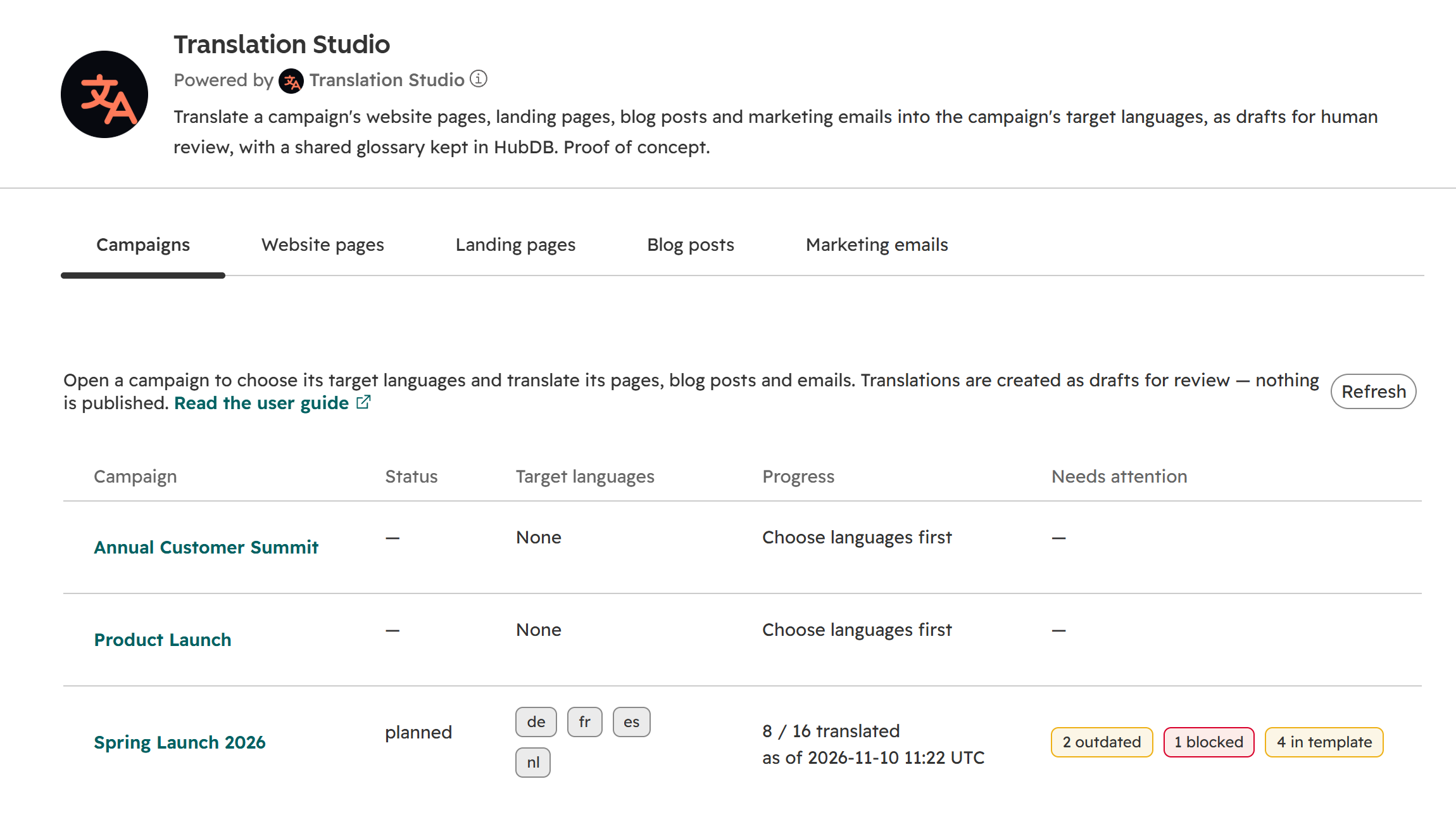
The Campaigns tab: one row per campaign, with its languages and what needs attention.
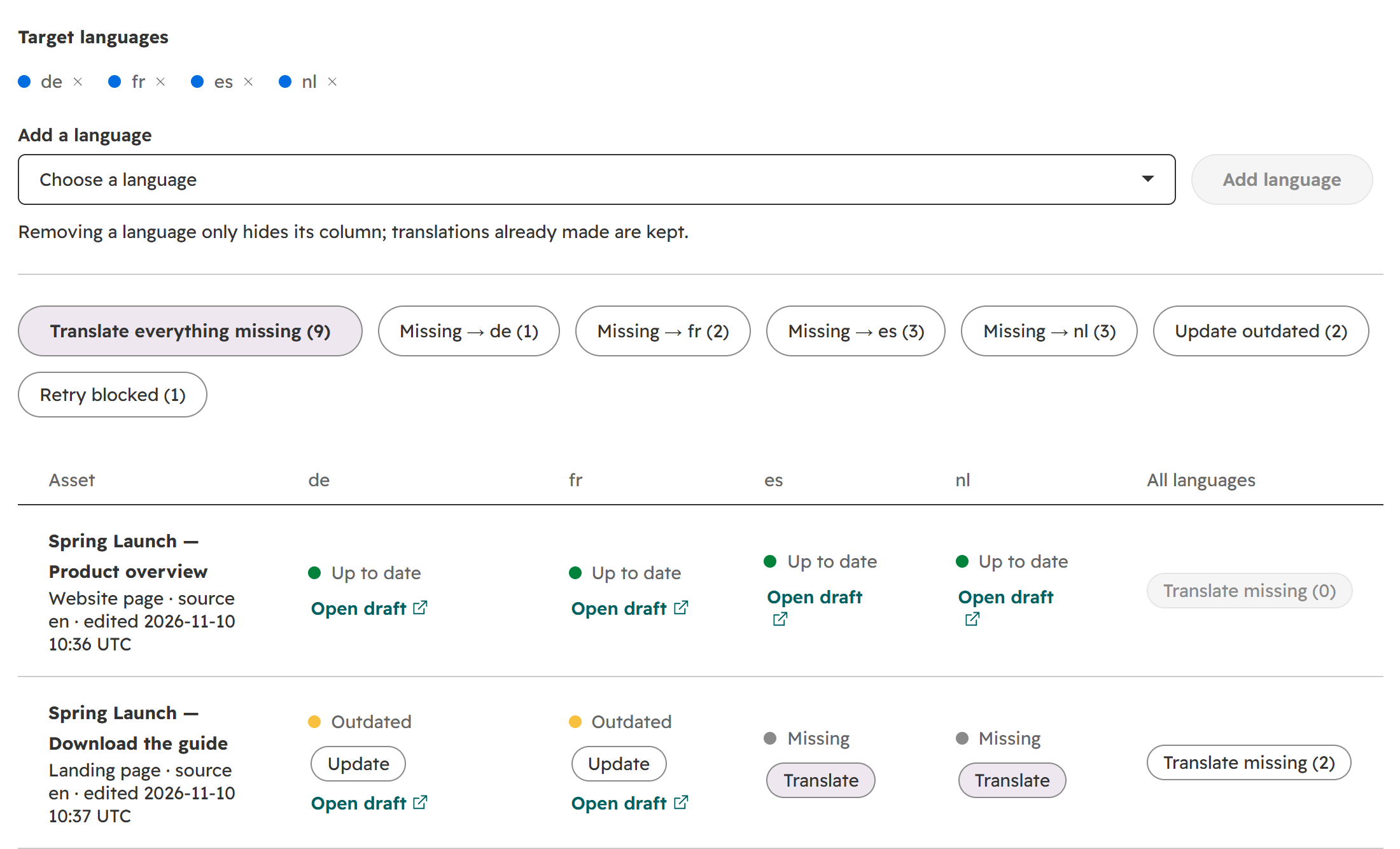
Choosing languages and acting on a whole language, a whole row, or a single cell.
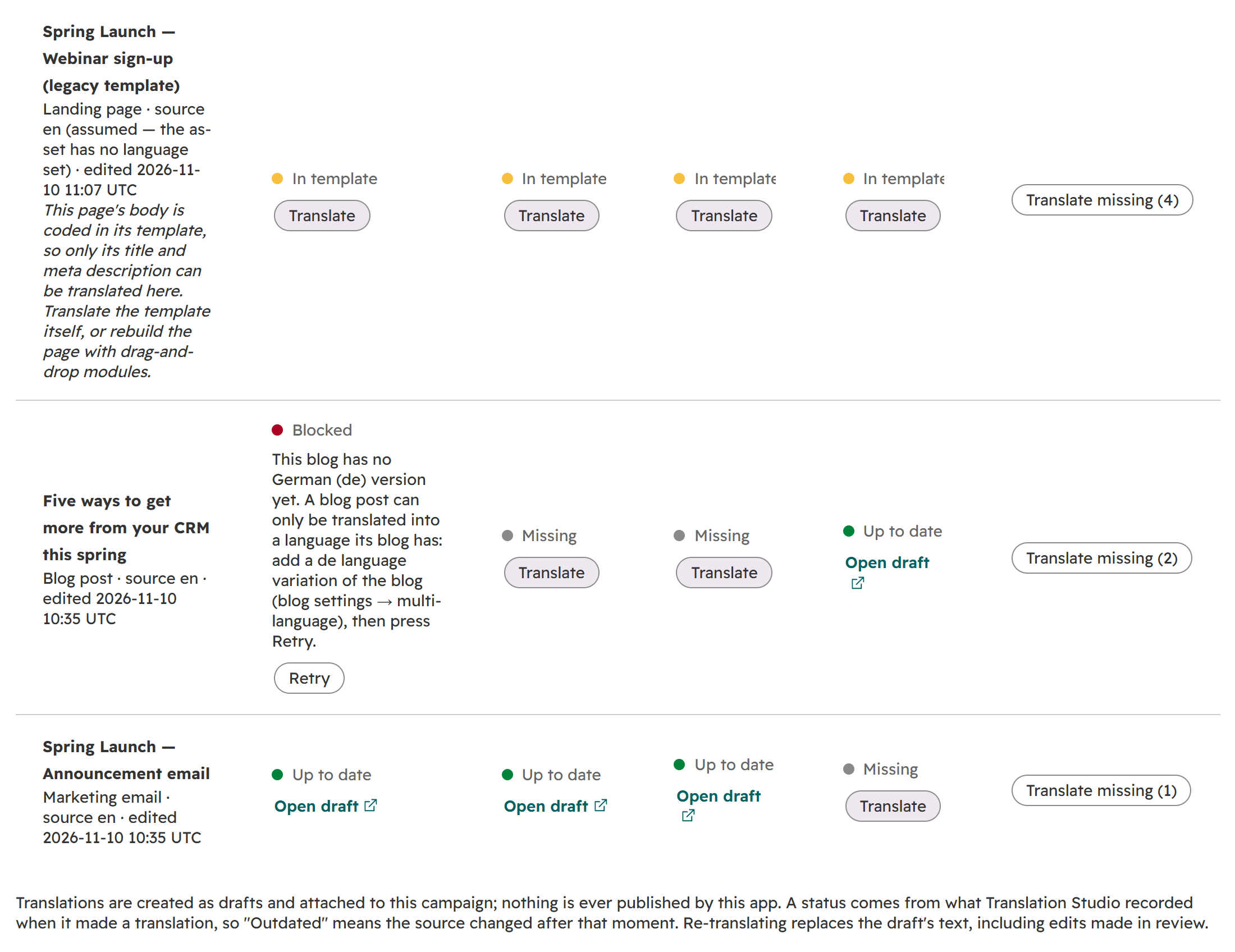
A page whose body is in its template says so instead of pretending to be translated, a blocked blog post names its own fix, and the footnote states the two rules that matter in review.
Screenshots on this page are from a HubSpot test portal running the Test engine, which prefixes each text with the language — [DE] Welcome… — instead of translating it. That is why the settings screenshots show a Test engine banner.
What each status means#
Every status is judged from what the app recorded when it made the translation — never inferred by comparing dates on two different objects.
| Status | What it means | What to do |
|---|---|---|
| Up to date | Translated, the draft still exists, and the source has not changed since | Review and publish in HubSpot (Open draft). If the cell says Not yet attached to the campaign, Attach |
| Outdated | The source's content changed after it was translated | Update — re-translates and replaces the draft's text |
| Missing | Never translated into this language, or the translation was deleted | Translate |
| Exists, not tracked | A language version exists that the app did not make — written by hand, or by HubSpot's own AI translation | Adopt it so the app tracks it from now on, or leave it alone |
| Failed | The last attempt failed; the error is shown in the cell | Retry — or Retry failed (n) for all of them |
| Blocked | Something in HubSpot has to change first; the cell names the fix | Make the change, then Retry — or Retry blocked (n) for all of them |
| In template | A page whose body is coded in its template: only its title and meta description can be translated here. The reason is stated once, under the page's name | Translate covers the title and meta description; the body needs the template translated, or the page rebuilt with drag-and-drop modules. Never counted as translated, and never holds the campaign's progress below 100 % |
| Not supported yet | An asset type this version does not translate | Listed under the matrix, for completeness |
| Source language | This language is the asset's own | Nothing |
A change that touches only the source's metadata — for example, the page gaining a new language version — does not make a fresh translation read Outdated: the app compares a fingerprint of the translatable text as well as the edit time.
Your terms, every time#
The glossary is a HubDB table, Translation Studio — glossary, that your marketing team edits in HubSpot under Content → HubDB. One row per term and target language: the source term, the language code, the term to use, and an optional note.
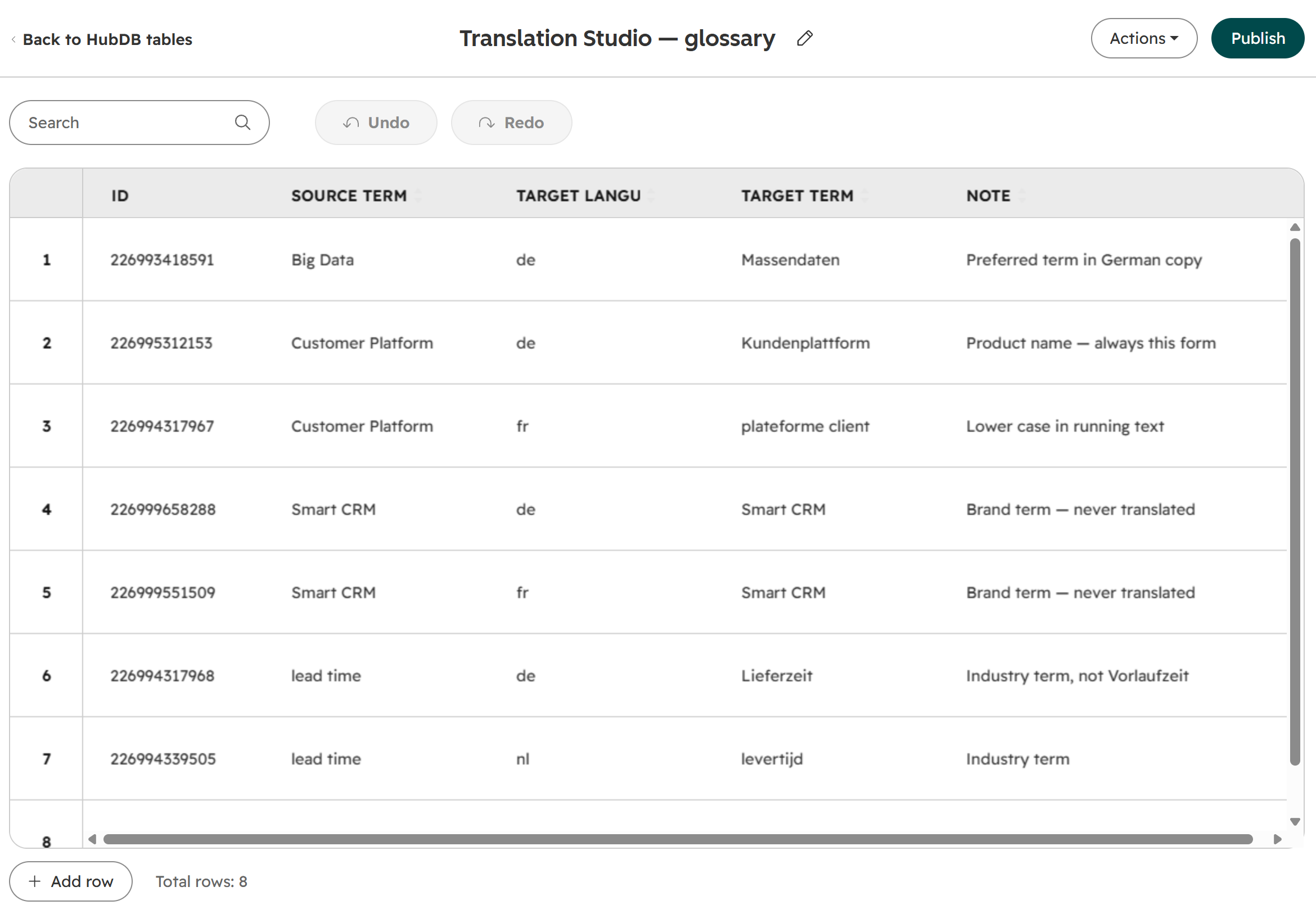
The glossary is an ordinary HubDB table. Draft rows count; there is no need to publish it.
How the terms reach each engine:
| Engine | How the glossary is applied |
|---|---|
| DeepL | The whole table becomes one DeepL glossary in your DeepL account, with one dictionary per target language. It is rebuilt on the next run after any change to the table, and the old one is deleted. DeepL adjusts glossary entries for case, gender and tense in inflecting languages, rather than pasting them in |
| Claude | For each batch of text, the terms that actually occur in it are sent as mandatory terms, with their notes |
| Test engine | Terms are applied literally, so the flow can be checked without a provider |
Three rules to know:
- Terms are written in the default source language set on the settings page. An asset in a different source language is translated without the glossary, and the run says so.
- A regional code inherits the base language. A row for
nlservesnl-nlandnl-be, unless another row namesnl-beexactly. - Rows DeepL would refuse are skipped and counted — a duplicate source term, an entry over 1,024 bytes, or an unsupported language. The run's notes report how many.
Engines, keys and what is sent where#
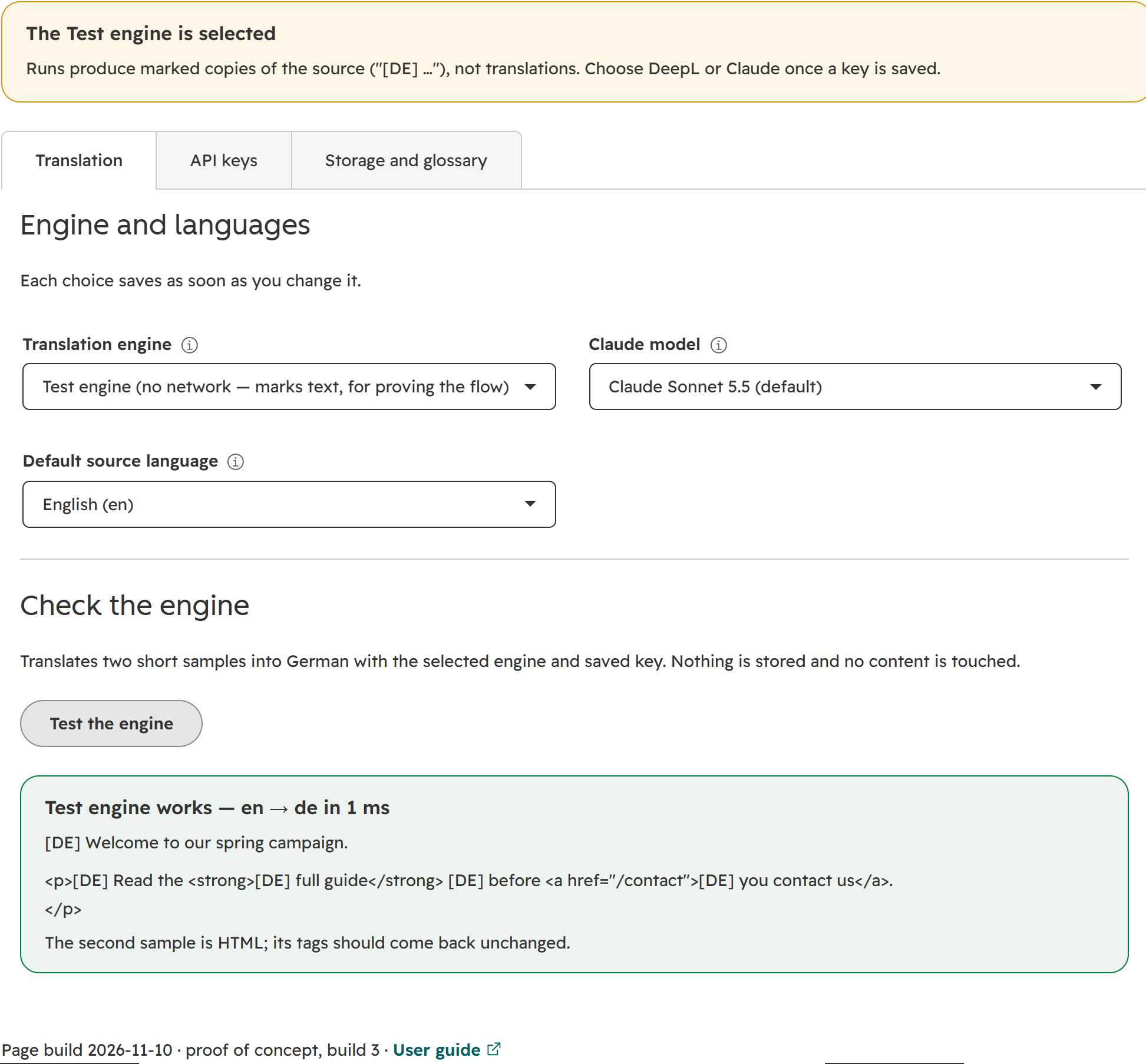
Choosing the engine, the Claude model and the default source language, then checking the engine on two samples.
| Engine | What it does | What leaves your portal |
|---|---|---|
| DeepL | Translates through DeepL's API with your glossary attached. A free-plan key (ending in :fx) is sent to DeepL's free endpoint automatically. HubSpot's template markup (HubL) is marked as not-to-translate | The extracted text and the glossary, to DeepL |
| Claude | Translates through Anthropic's API, in batches of up to 2,500 characters, with the glossary terms found in each batch as mandatory terms. Choose Sonnet 5.5 (default), Opus 5.5 or Haiku 5.5 | The extracted text and the matching glossary entries, to Anthropic |
| Test engine | Prefixes each text with the target language and makes no network call. The default, so the flow can be proven before any key exists | Nothing |
Only text is sent. The app reads the text fields of each module — headings, body text, button labels, image alt text — plus the page title and meta description, a blog post's title, body and summary, and an email's subject and text. Keys, ids, URLs, colours, fonts and other style values are never sent. The app's functions run inside HubSpot, and the only outside hosts it is configured to call are DeepL's two API hosts and Anthropic's.
Cost sits with your provider account. DeepL bills on source characters, and each target language counts separately; HTML tags do not count when tag handling is on (DeepL's documentation, read 2026-11-10). Whether DeepL glossaries are available on DeepL's free API plan was not confirmed — check your DeepL contract.
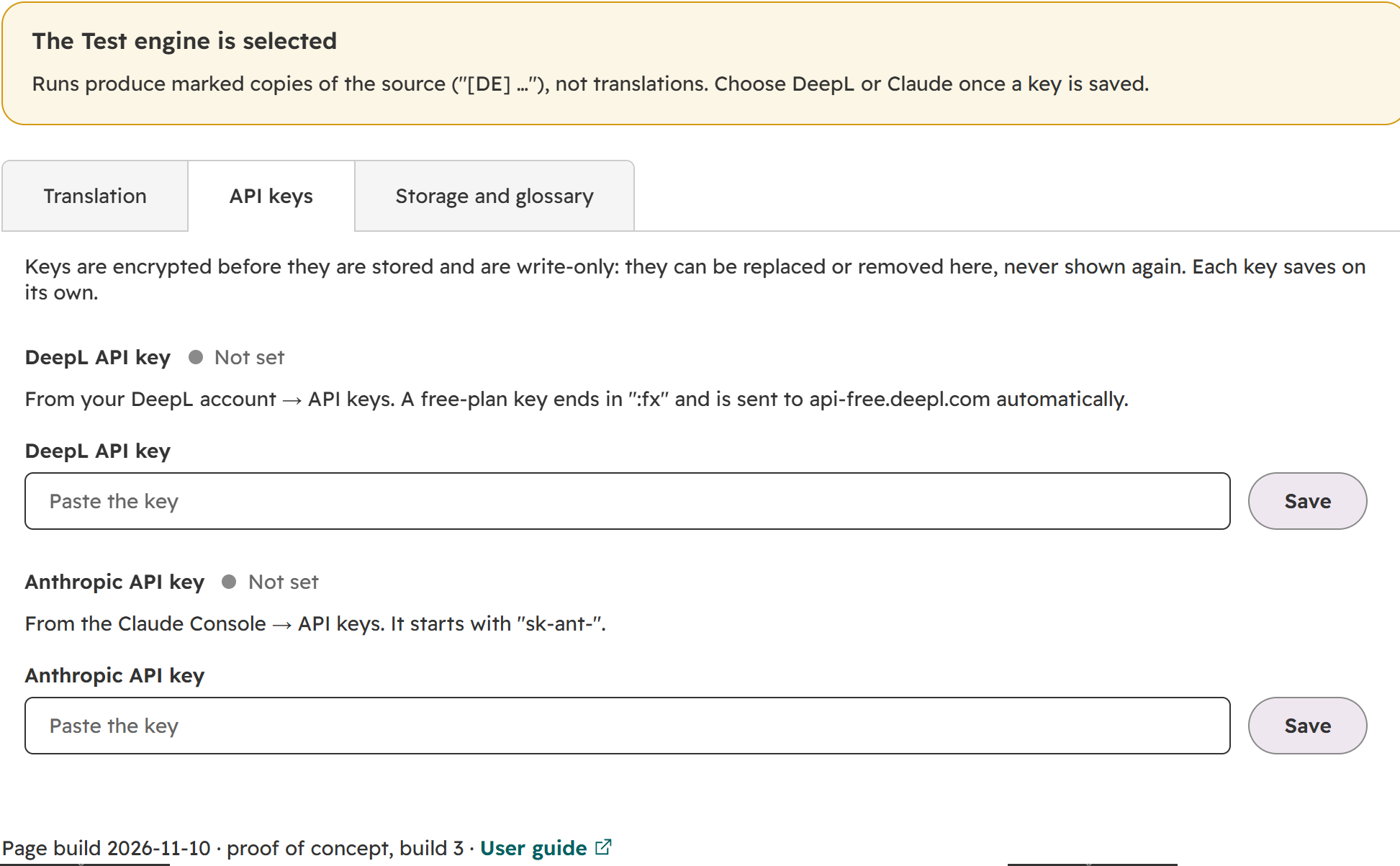
Keys are write-only: once saved they can be replaced or removed, never read back.
Your keys stay on your portal. A key is checked for the right shape, encrypted (AES-256-GCM) and stored in a settings record on your portal. It is never returned to the page — not even masked. It is read only where the app calls the provider.
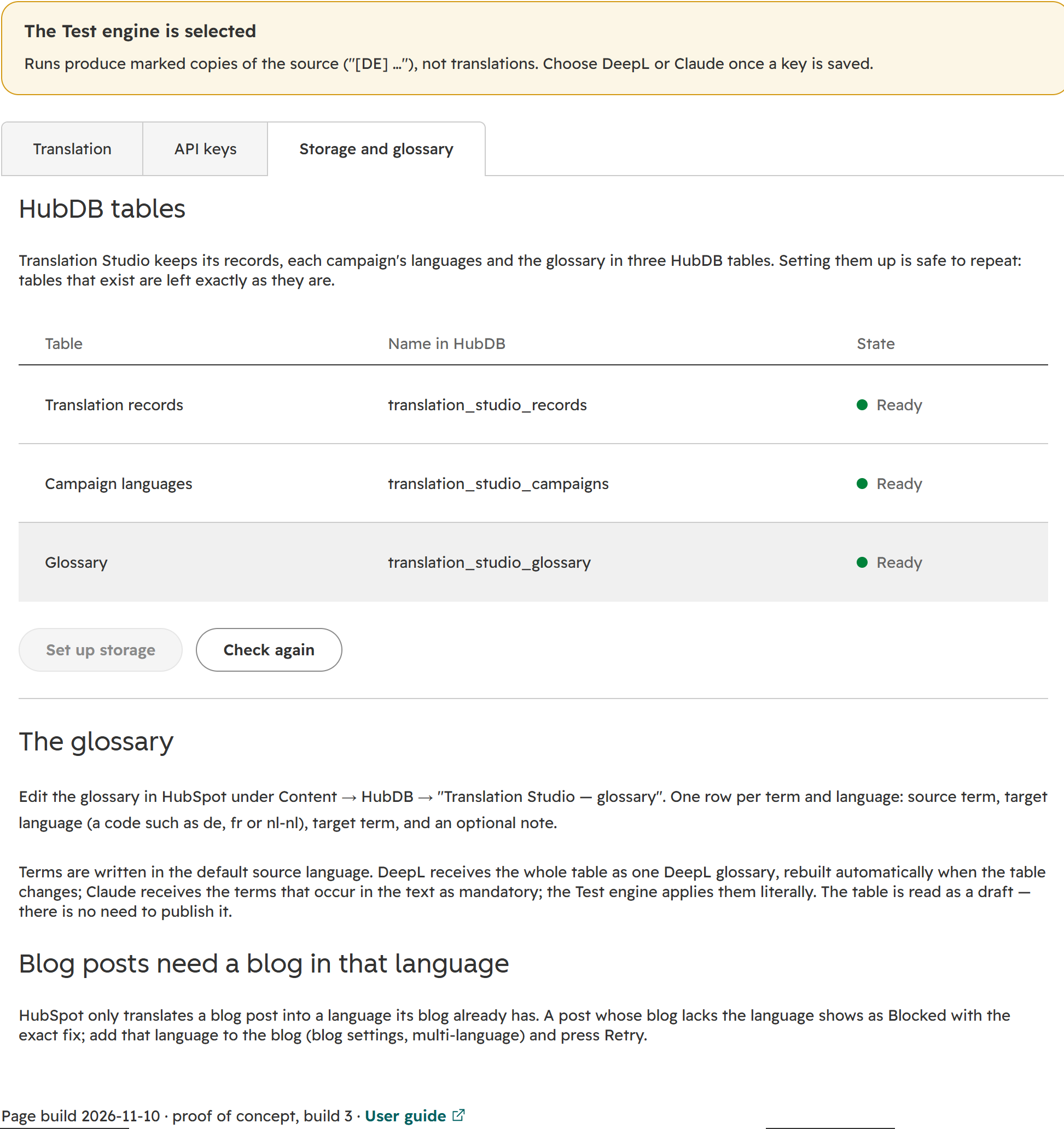
Storage is set up once from the settings page; repeating it leaves existing tables untouched.
What it translates today, and what it does not#
| Content | Today |
|---|---|
| Website pages and landing pages built from drag-and-drop areas and modules, including custom modules | Translated into a native HubSpot language variation, as a draft |
| Blog posts | Translated into a native language variation, as a draft — provided the blog already has that language. HubSpot refuses otherwise, and the cell shows Blocked with the fix: add the language to the blog once, in its multi-language settings |
| Marketing emails | Translated into a copy of the email with its language set, as a draft. HubSpot's API has no language-variation route for emails, so the copy is not linked to the original as a variation; the app keeps the link in its own records |
| Pages whose body lives in the template (older, template-coded pages) | Not translatable per page. The body text is not in the page's content at all, so only the title and meta description can be translated. The matrix marks such a page In template and says why, under its name, instead of calling it translated |
| Any other campaign asset — forms, CTAs and the like | Not translated; listed under the matrix as Not supported yet |
What it deliberately does not do:
- Publish. Every translation is a draft. A person reviews and publishes in HubSpot.
- Change your blog's settings. Adding a language to a blog is an admin decision, so the app reports Blocked with the fix rather than doing it.
- Translate anything that is not recognisably text. A module field the app cannot identify as text is left untranslated — an untranslated field is the safe failure; a translated style value is not.
Limits of this version, stated once:
- Update replaces the draft's text, including edits made in review. Review last, or re-apply edits after an update.
- Runs happen in your browser tab. Keep the app page open while a run is going; closing it stops after the asset in flight, and a rerun picks up from what was recorded. With the Test engine, one asset into one language took about 4–5 seconds; DeepL and Claude timings have not been measured yet.
- A field is recognised as text by its name and content. A custom module that names a text field unusually is skipped.
- Blocked is only known after an attempt. A blog post whose blog lacks the language shows Missing until someone tries.
- Storage is HubDB, with HubSpot's limit of 10,000 rows per table — one row per asset and language translated.
- Languages: 15 — English (British by default, or American), German, French, Spanish, Italian, Dutch, Polish, Portuguese (European or Brazilian), Swedish, Danish, Finnish, Czech, Japanese and Chinese (simplified), with regional codes such as
de-at,fr-beandnl-be. A code outside this list is refused with the list, never guessed.
Where your data lives#
Everything stays on your portal.
| Store | Holds |
|---|---|
HubDB translation_studio_records | One row per asset and language: the source version the translation was made from (edit time and text fingerprint), the engine, the outcome (ok, failed or blocked), any error, and whether it is attached to the campaign. Statuses are read from here |
HubDB translation_studio_campaigns | Each campaign's target languages, and the progress summary shown on the Campaigns tab |
HubDB translation_studio_glossary | Your terms |
Custom object app_setting | The engine, Claude model and default source language; the encrypted keys; the id of the DeepL glossary the app maintains |
Records are kept per asset, not per campaign: an asset in two campaigns shares its translations. The app creates no association labels; translated drafts are attached to the campaign as campaign assets. It has no public web address — its functions answer only to a signed-in user of the portal it is installed on, from its own app page and settings page.
Requirements and getting it#
Your portal needs:
- Content Hub Professional or Enterprise — multi-language pages and blog posts.
- Marketing Hub Professional or higher — campaigns and marketing emails.
- An Enterprise subscription on at least one hub — the app keeps its settings in a small custom object, and custom objects need Enterprise. It has only been run on an Enterprise portal.
- HubDB — the records and the glossary.
- For real translations, a DeepL API key, an Anthropic API key, or both. Neither is needed to try the flow with the Test engine.
Permissions it asks for at install, in plain words:
| Permission | Why |
|---|---|
| Custom objects and their schemas, read and write | The settings record |
| Content | Read pages, landing pages and blog posts; create language variations; write drafts |
| Marketing email (shown at install as Marketing Single Send API access) | Read, copy and update marketing emails |
| Campaigns, read and write | List campaigns, read their assets, attach translations |
| Data-integration file data sources, read and write | HubSpot requires these to read a campaign's assets; without them each asset read was refused with a 403 on the portal where this was tested |
| HubDB tables and rows, read and write | The three tables |
Getting it. Translation Studio is distributed as a HubSpot project you upload to your own portal with HubSpot's CLI and install there as a private app. It is shared by invitation: go to worksby.design/get/translation-studio, enter the email address that was invited, and a download link arrives within a minute. The link works for 24 hours; when it has expired, ask for a new one on the same page. Not on the list? Say which package you are after through worksby.design/contact — access is arranged per organisation. The zip (Apache 2.0) carries INSTALL.md — build, upload, install, first visit to the settings page, storage, keys and the glossary — and DOCUMENTATION.md for anyone extending it.
On first open the settings page prepares its settings record; Set up storage creates the HubDB tables; the API keys tab takes your keys; Test the engine translates two samples into German without storing anything.
What comes next#
In the order planned:
- Runs against DeepL and Claude, with timings per page size.
- Glossary import — load an existing term list from a spreadsheet file, or use a glossary you already keep in DeepL.
- Runs that continue on the server, so closing the page no longer stops a run and long pages are not bound by a browser session.
- Text found from each module's own field definitions, instead of by field name — and an Update that keeps reviewer edits, re-translating only the text whose source changed.
- Translation outside campaigns — tabs per content type (website pages, landing pages, blog posts, marketing emails), and a Translate action in HubSpot's own content lists if HubSpot opens its bulk actions to content.
- Storage beyond HubDB, and availability as a public app installed from a link rather than uploaded.
Smaller items on the list: more engines, a check that reports any glossary term an engine did not respect, a review task for the language owner when a draft is ready, an explicit "publish reviewed translations" action (never automatic), and more languages as HubSpot and the engines support them.
Try it#
The fastest evaluation is one of your own campaigns, copied, with your term list in the glossary and your own DeepL or Anthropic key — the drafts land in HubSpot's editors where your language owners already work. To set that up, or to see it running first, contact worksby.design →
HubSpot, DeepL, Anthropic and Claude are trademarks of their respective owners. worksby.design is an independent publisher, not affiliated with HubSpot, DeepL or Anthropic.