App · Translation Studio
One campaign, every
language.
worksby.design's Translation Studio translates a HubSpot campaign — its website pages, landing pages, blog posts and marketing emails — into the languages you choose, as drafts in HubSpot's own editors, with your team's glossary applied on every run.
Available through selected HubSpot partners. Ask your HubSpot partner about Translation Studio — they install it on your portal, set it up with you and support it.
01 The walk-through
Nine translations, one run.
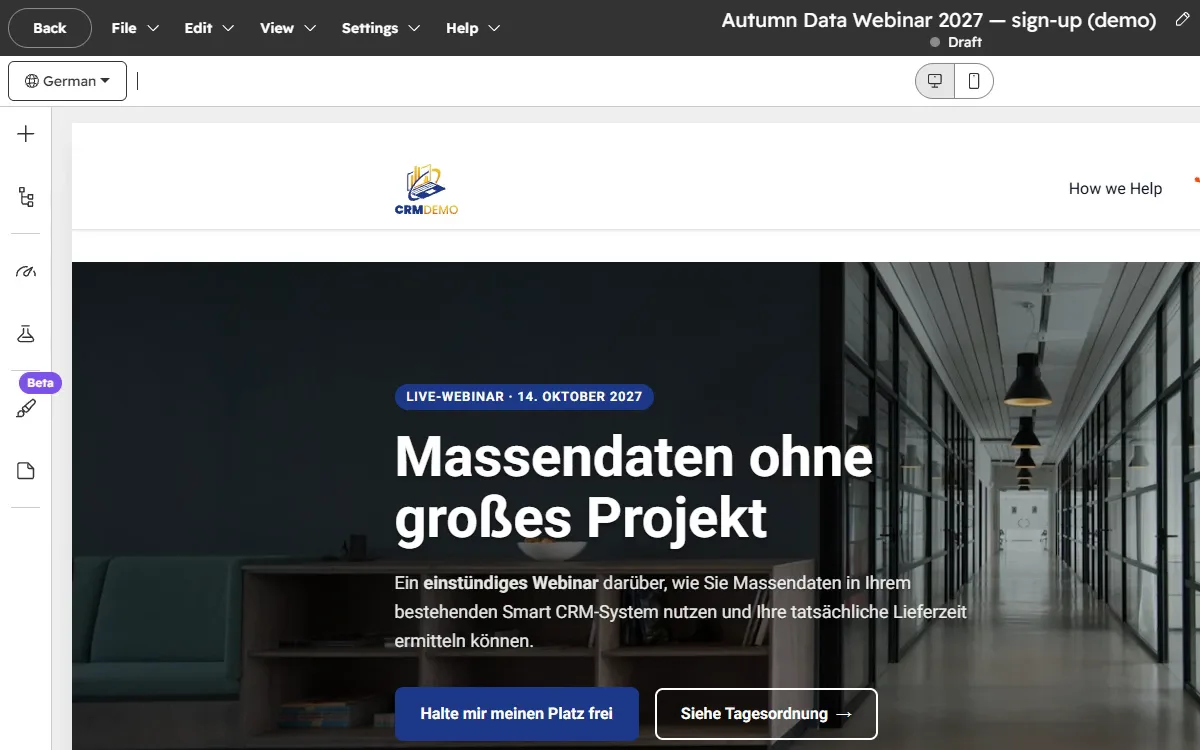
An English campaign's landing page, blog post and email get their German, French and Dutch drafts in one run, with the team's glossary, and the German landing page opens in HubSpot's own page editor for review.
Recorded on a HubSpot demo portal, with an invented campaign, translated by DeepL. English captions — switch them on in the player.
02 What it does
Your terms, one run, your review.
01 — See what is missing
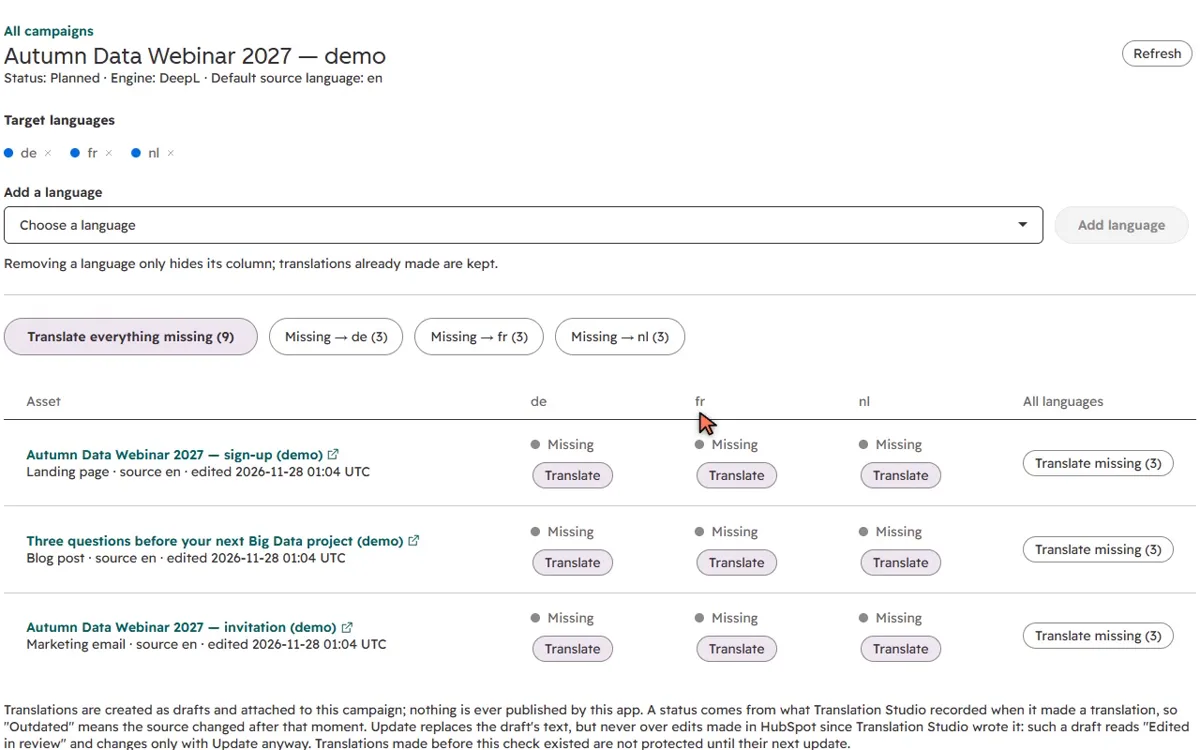
One grid shows what each language lacks.
Each campaign is a grid: one row per asset, one column per language, and in every cell a status from the app's own records — up to date, outdated, missing or blocked. Outside campaigns, a tab per content type does the same for one item at a time.
02 — Your team's words
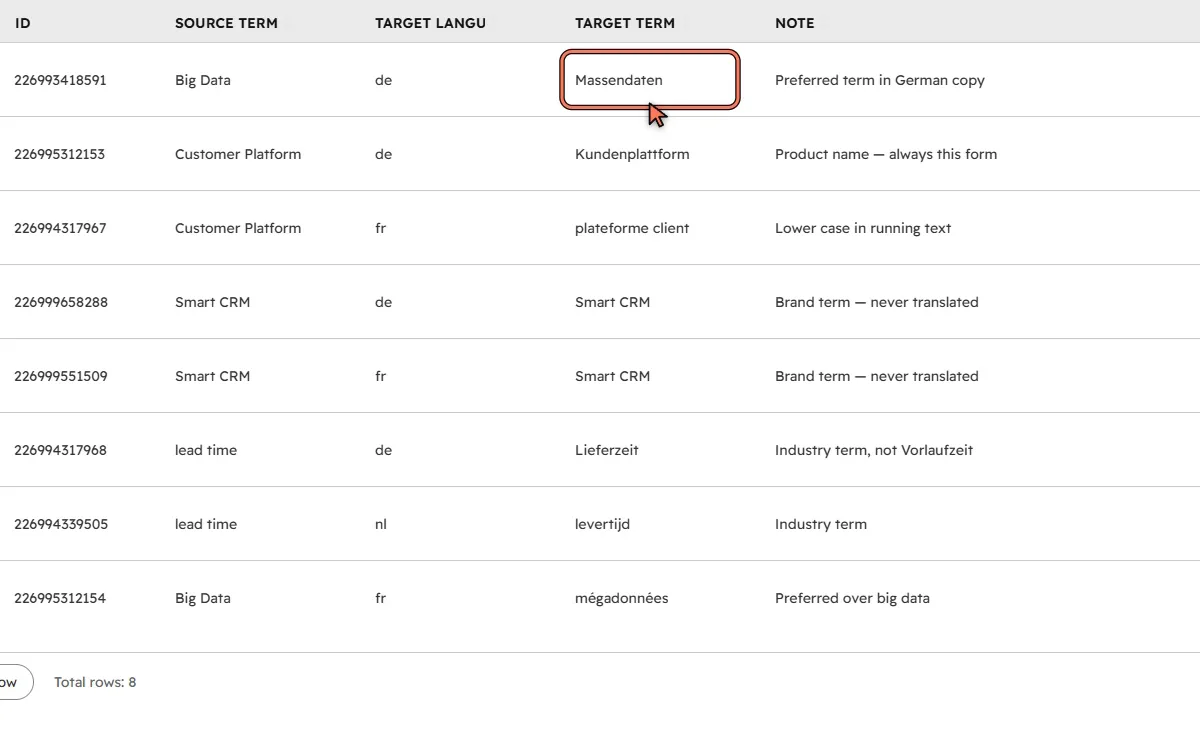
Your glossary, applied on every run.
A glossary your marketing team keeps in a HubDB table — "Big Data is always Massendaten", "Smart CRM is never translated" — applied by DeepL or Claude on every run.
03 — Drafts for review
Every translation waits as a draft.
Everything missing is translated in one run, and every translation waits as a draft: a page or post as a native language variation in HubSpot's own editor, an email as a language copy. Nothing is published until your team does it.
Status, stated plainly.
Translation Studio is a proof of concept. The whole flow has run with its built-in Test engine, and DeepL (with its glossary) and Claude have run against the live services on a test portal; it has not yet been used on a customer's content. It has only been run on an Enterprise portal.
03 Works with
HubSpot's own campaigns and editors.
Translation Studio needs no other worksby.design app. It works with HubSpot campaigns, HubSpot's page, blog and email editors and HubDB, and with your own DeepL or Anthropic account: a translation of an asset in a campaign is attached to the same campaign.
04 Where your data is
Everything stays on your portal.
Translation Studio stores its data in your own portal, and no worksby.design server is involved. Only the text being translated goes out, to the engine you chose, on your own account.
In your portal
- Three HubDB tables — the translation records and the glossary — and one settings record
- Engine keys encrypted with a secret held in your own HubSpot account, never sent back to the page — not even masked
- The translated drafts, in HubSpot's own editors
Outside your portal
- To DeepL: the text to translate and the glossary, which is copied into a glossary in your DeepL account
- To Anthropic, when Claude is chosen: the text and the matching glossary entries
- Only text is sent — keys, ids, URLs, colours, fonts and other style values never are
If you remove it: uninstalling leaves its data in place. Delete the three HubDB tables, the settings records, the secret and the DeepL glossary to leave nothing behind; the translated drafts and anything you published stay.
05 Who does what
Three parts, three owners.
worksby.design
Builds the app, publishes it and keeps it working as HubSpot's platform versions move.
Your HubSpot partner
Installs it on your portal, sets it up, adapts it where your process needs it, trains your team and supports you.
You
Own the portal and every record in it. The app's records stay in your CRM.
Ask your HubSpot partner about it.
Translation Studio is available through selected HubSpot partners, who install it on your portal, set it up with you and support it.
The guide at /docs/translation-studio covers what your portal needs, the permissions it asks for and every status. Facts on this page checked .